
Skip to content

NewQuiz library, gamification & bus tracking.What's new in the release notes

School ERP · Web app · Android · iOS

Run your entire school from one connected platform

Admissions, fees and online payments, attendance, exams, timetable, accounting, quizzes and live bus tracking — with apps for students, parents, staff and drivers. Built for how schools in India work.

  • Thousands of students & parents on the app
  • Data import & training included
  • Designed with India's DPDP Act in mind
  • Support on phone, WhatsApp & email
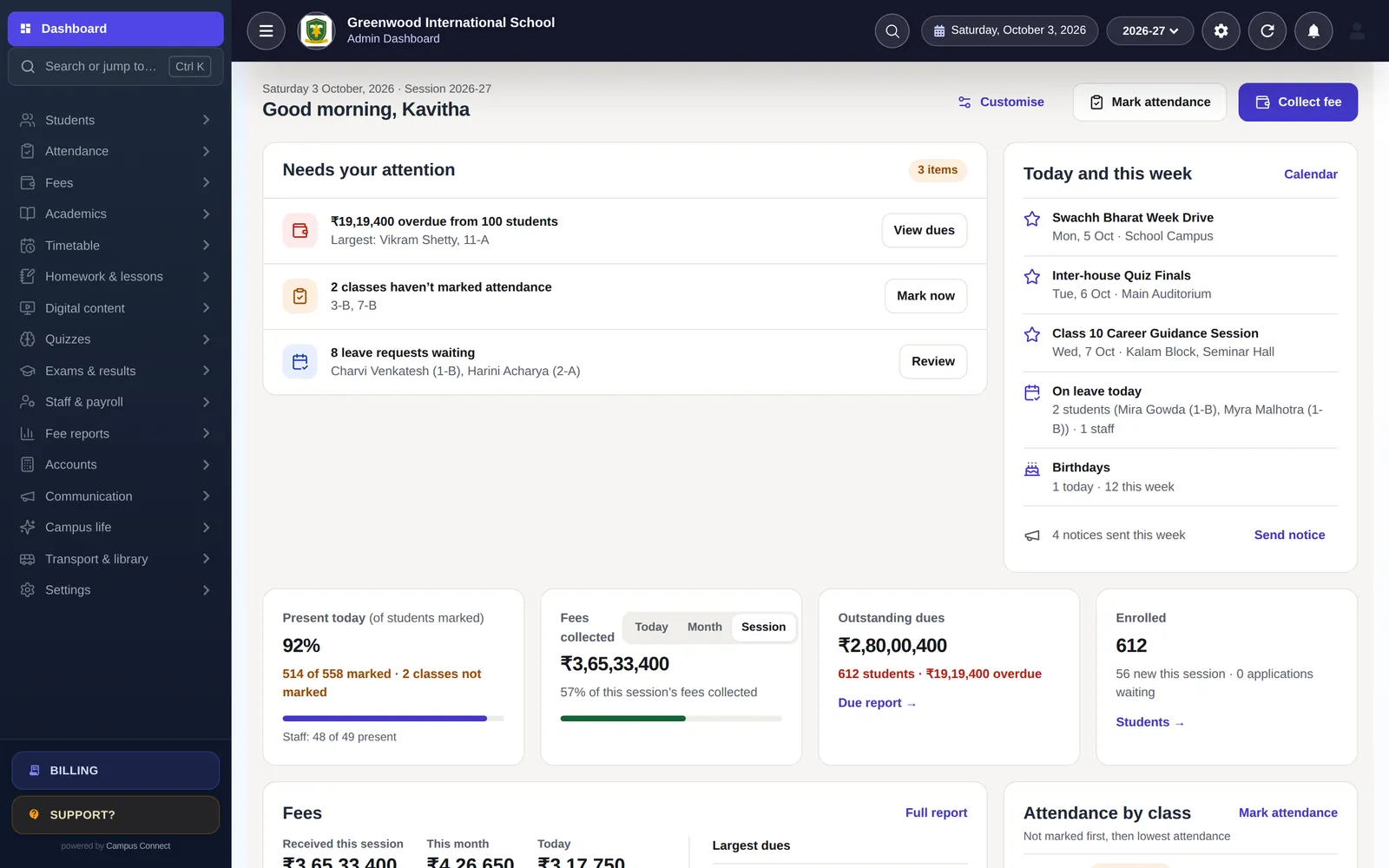
CampusConnect admin dashboard: overdue fees, classes yet to mark attendance, leave requests, this week's events and live attendance, fee and enrolment figures
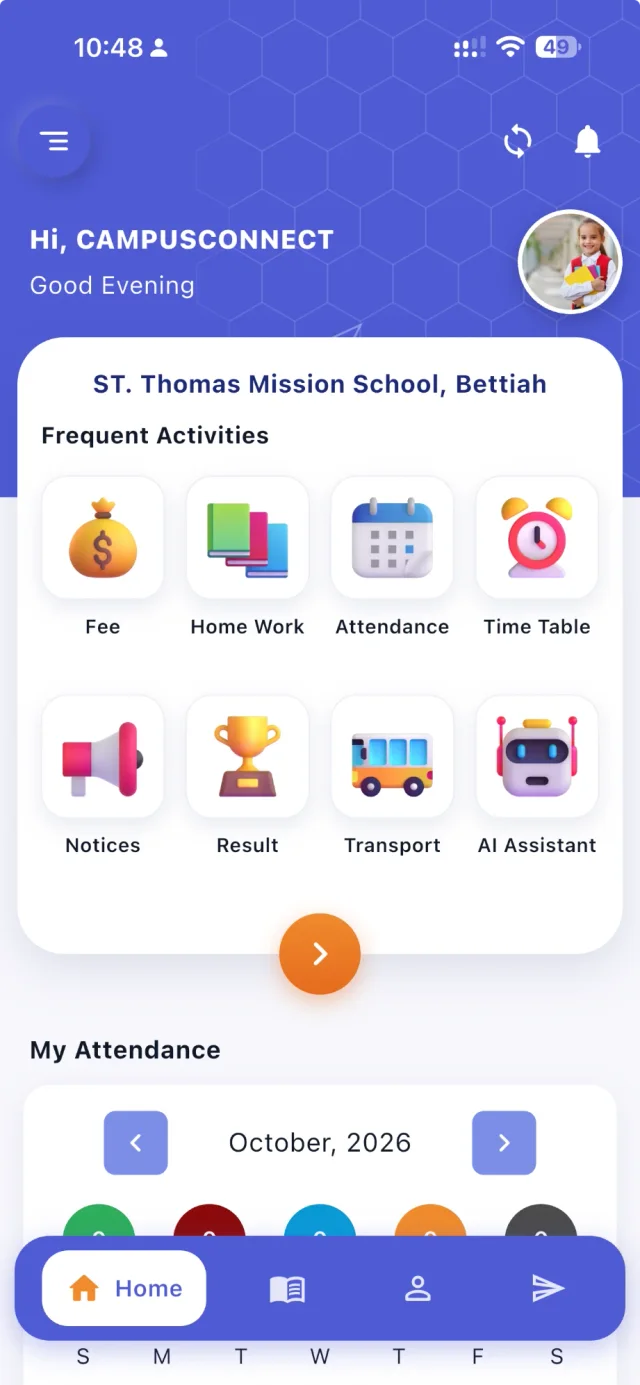
CampusConnect app home for a student: greeting, profile photo, frequent activities — Fee, Home Work, Attendance, Time Table, Notices, Result, Transport, AI Assistant — and My Attendance

Trusted by schools across India — used every day by thousands of students and parents

of students and parents use the CampusConnect app
Thousands
ready-made, diagram-based quiz sets for classes 1–12
60
modules sharing one set of school data
20+
platforms: web app, Android and iOS
3

One connected journey

From admission to the parent's phone — without re-typing anything

Every module shares the same student record. Watch one student's journey flow through CampusConnect, or click a step to explore.

Choose a step of the school journey

1Step 1 of 6 · Admission

Student list with photos, admission numbers, class-section and tags, with search and filters

A new student joins

The family fills the online admission form — or the office adds the student, or bulk-admits a whole class from Excel. A Student 360 profile is created once and used everywhere.

  • Online admission forms and admission fees
  • Bulk admit and bulk update from Excel
  • Student 360: one profile for every module

2Step 2 of 6 · Fee collection

Collect fee screen: dues listed overdue-first with Collect, Receipts and Discount actions
CampusConnect app home for a student: greeting, profile photo, frequent activities — Fee, Home Work, Attendance, Time Table, Notices, Result, Transport, AI Assistant — and My Attendance

Fees are set up and collected

The class fee structure applies automatically. Parents see what is due in the app and pay online; the receipt is generated instantly and the payment lands in your fee reports and accounts.

  • Fee heads, installments, fines and concessions
  • Online payment in the parent app
  • Receipts, due reports and daybook update instantly

3Step 3 of 6 · Attendance

Mark attendance: class chips show which sections are done; every student starts Present

Attendance is marked in seconds

Teachers mark the class on the web or the staff app — or attendance comes in from biometric/RFID devices. Parents with the app are notified when attendance is saved.

  • Card-based marking with keyboard shortcuts
  • Biometric / RFID device integration
  • Monthly reports by class, student and staff

4Step 4 of 6 · Exams & marks

Illustration

Exams are scheduled and marks entered

Set up exam heads and schedules, issue admit cards and let each subject teacher enter marks — with grades and co-scholastic areas.

  • Exam heads, schedules and admit cards
  • Subject-wise marks entry by teachers
  • Grades and co-scholastic areas

5Step 5 of 6 · Report card

Illustration

Results and report cards are published

Configurable result tables turn marks into printable report cards. Once you publish, results appear for students and parents in the app.

  • Configurable result tables
  • Printable report cards
  • Results visible in the app once published

6Step 6 of 6 · Parent app

  • Attendance savedAarav is marked Present today.
  • Receipt readyExam fee paid online — receipt is in the app.
  • New notice from schoolParent–teacher meeting slots are open. Book a time.
CampusConnect app home for a student: greeting, profile photo, frequent activities — Fee, Home Work, Attendance, Time Table, Notices, Result, Transport, AI Assistant — and My Attendance

Parents stay in the loop

Attendance, fees and receipts, notices, homework, results, meetings and the live school bus — everything the school records shows up in the parent app.

  • Notified when attendance is saved
  • Push notifications for notices
  • Receipts, results and homework in one app

Product tour

Made for everyone on campus

Each person signs in to an experience built for their role — on the web, Android or iOS.

Choose a role

Your whole school, on one screen

Principals, administrators and accountants see attendance, fees, dues, admissions and what needs attention the moment they log in — and act on it in a click.

  • “Needs your attention” list with one-click fixes
  • Fees, dues and attendance by class, live
  • Search or jump to any page with Ctrl K
  • P&L, trial balance and balance sheet from the same data

Less time chasing numbers across registers and spreadsheets: today's picture is already on the dashboard.

Explore all modules
CampusConnect admin dashboard: overdue fees, classes yet to mark attendance, leave requests, this week's events and live attendance, fee and enrolment figures

Classroom admin in minutes, on web or phone

Teachers mark attendance, set homework, enter marks and run quizzes from the web app or the CampusConnect Pro app — without waiting to reach a computer.

  • Mark a class, then change only the exceptions
  • Homework, lesson plans and student diary
  • Marks entry and results
  • 60 ready-made quiz sets with automatic marking

Attendance becomes a quick tap-through, and ready-made quizzes replace setting and marking practice papers by hand.

About CampusConnect Pro
Teacher marks attendance for a section: present, absent, late or half-day

Everything about the school day, in one app

Attendance, homework, fees and receipts, results, quizzes, notices, meetings and the live school bus — on Android and iOS.

  • Pay fees online and keep every receipt
  • Interactive quizzes with instant feedback
  • XP, badges, streaks, league and House Cup
  • Book parent–teacher meetings

Fewer calls to the school office: answers parents used to ask for are already in the app.

About the Parent app
Student and parent dashboard: fees due, today's attendance, level and badges, and the latest notice
CampusConnect app home for a student: greeting, profile photo, frequent activities — Fee, Home Work, Attendance, Time Table, Notices, Result, Transport, AI Assistant — and My Attendance

“Where's the bus?” — answered

Drivers sign in with the school code, their mobile number and an OTP, start the trip, and the bus appears live for parents on that route and for the school.

  • Driver login with school code, mobile and OTP
  • Live location for parents on the route
  • Admin live map of every bus on a trip
  • Recent trips and trip replay

Fewer “where is the bus?” calls to drivers and the office during pick-up and drop.

Read the bus tracking guide
Live bus tracking map with three buses on their routes, plus driver, start time, last update and speed

See the full product tour

Platform

Every module your school needs, connected

Start with what you need today and switch on more as you grow — it's all one login and one set of data.

Quizzes & gamification

Practice students actually look forward to

Teachers pick from 60 ready-made, diagram-based quiz sets for classes 1–12 — Maths, Science/EVS, Reasoning and interactive challenges — or write their own. Students tap on diagrams, match pairs and put steps in order, and earn XP for every quiz.

  • Tap, match, order, number and MCQ questions
  • Instant feedback with explanations
  • XP, levels and 18 badges
  • Daily and weekly streaks
  • Class & school league — names, anonymous or off
  • A fair, section-wise House Cup
See how quizzes work
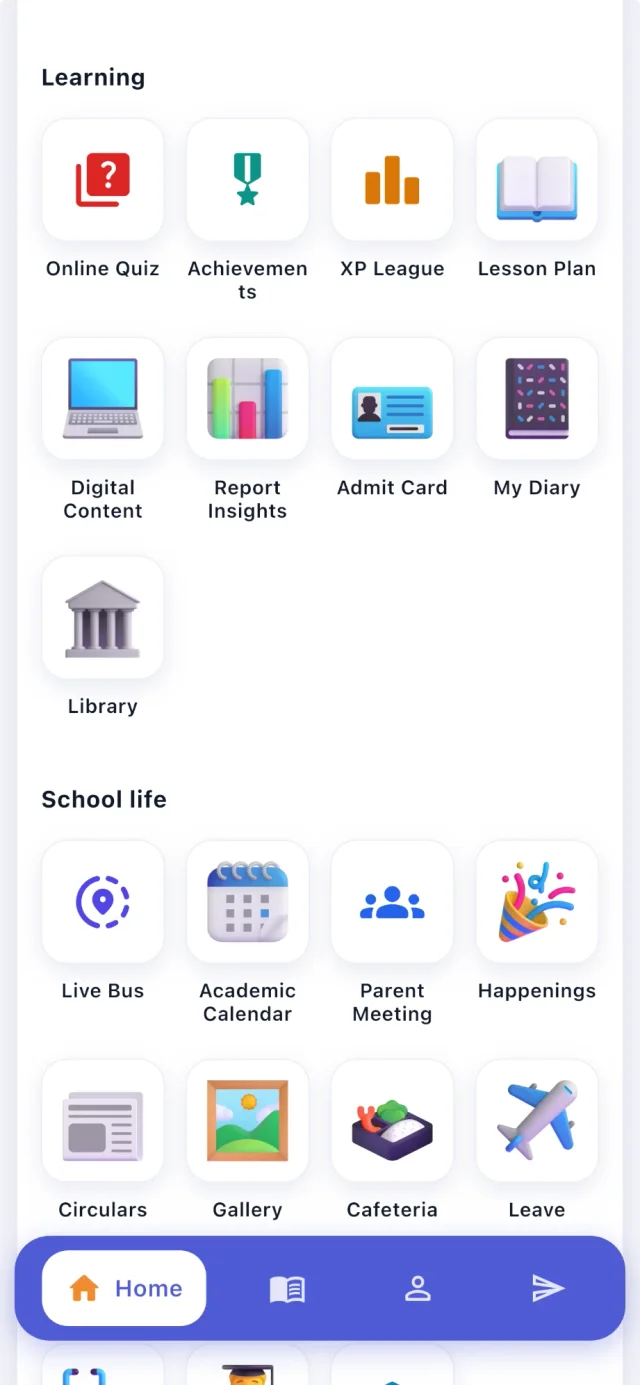
CampusConnect app menu: Learning (Online Quiz, Achievements, XP League, Lesson Plan, Digital Content, Report Insights, Admit Card, My Diary, Library) and School life (Live Bus, Academic Calendar, Parent Meeting, Happenings, Circulars, Gallery, Cafeteria, Leave)

Why switch

CampusConnect vs registers and legacy software

A fair, plain comparison with what most schools use today. Legacy systems vary — this is what is typical.

CampusConnect compared with registers and spreadsheets and with typical legacy ERP software
Registers & spreadsheetsExcel, paper, WhatsApp groupsTypical legacy ERPDesktop or office-bound softwareCampusConnectWeb + Android + iOS
Daily operations
Fee collection & receiptsManual entries, hand-written receiptsAt the office counterAt the counter or online in the parent app, with instant receipts
AttendanceRegisters, re-typed into sheetsDesktop entry, often end of daySeconds per class on web or phone; biometric/RFID sync
TimetableBuilt by hand every term PartlyAutomatic generator with teacher availability and rules
Accounting from feesOften a separate packageFees, expenses and payroll post to the ledger automatically
Parents & students
Parent app PartlyAttendance, fees, homework, results, notices, meetings, live bus
Online quizzes & practice60 ready-made sets for classes 1–12, plus your own quizzes
Live bus trackingSeparate GPS hardwareDriver's phone shares location — no extra device
Control & growth
Role-based access
Audit log of important actions Partly
Updates and new features—Upgrades and reinstallsDelivered continuously on the web; app updates on phones
Multiple schools / branchesOne file per branch PartlyMany schools on one platform, each with its own data

Live bus tracking

“Where's the bus?” — answered

The driver starts the trip in the CampusConnect app; parents on that route see the bus move live, and the school sees every bus on one map.

Live bus tracking map with three buses on their routes, plus driver, start time, last update and speed

Mobile apps

An app for everyone on campus

Students and parents, teachers and staff, school admins and drivers — one app on Android and iOS, a role-specific experience for each.

CampusConnect app home for a student: greeting, profile photo, frequent activities — Fee, Home Work, Attendance, Time Table, Notices, Result, Transport, AI Assistant — and My Attendance
CampusConnect app menu: Learning (Online Quiz, Achievements, XP League, Lesson Plan, Digital Content, Report Insights, Admit Card, My Diary, Library) and School life (Live Bus, Academic Calendar, Parent Meeting, Happenings, Circulars, Gallery, Cafeteria, Leave)

Integrations

Works with the services your school already uses

Payments, SMS, push notifications, biometric devices, maps and storage — built in, not bolted on.

  • Payments

    Easebuzz payments

    Parents pay fees online from the app through the Easebuzz gateway; the school's gateway keys are stored encrypted and payment status is confirmed with Easebuzz.

  • Messaging

    SMS gateway

    Bulk SMS to classes and individuals, plus OTPs for mobile login — through a configurable SMS provider (AuthKey.io; 2Factor for OTP).

  • Messaging

    Push notifications

    Notifications to the parent and staff apps via Firebase Cloud Messaging and Novu, and browser notifications via Web Push.

  • Messaging

    Email

    Fee e-mail notifications, OTP e-mails and daily fee-collection summaries.

  • Attendance

    Biometric & RFID devices

    Attendance from biometric and RFID devices is synced into student and staff attendance.

  • Transport

    OpenStreetMap

    Live bus locations and trip replays are shown on OpenStreetMap maps in the web and mobile apps — no separate GPS hardware needed.

  • Storage

    Cloudinary & Amazon S3

    School media and documents can be stored on Cloudinary or Amazon S3, including a school's own storage account.

  • Data

    Excel import & export

    Bulk-admit students and import fee masters, fee records and dues from Excel; export lists and reports to Excel or PDF.

Also from CampusConnect

Vidyaan — interactive NCERT chapters for Class 1 to 12

A learning app for students with quick quizzes, revision, streaks and progress. Free chapters in every subject; the full course is ₹120 per class.

Explore Vidyaan

Security & trust

Built to protect children's and families' data

Schools trust us with sensitive records. Here is how the platform protects them — described plainly, and only what we can show in our code.

Visit the trust centre
  • Role-based access

    Admins, staff, students, parents and drivers each see only what their role allows.

  • Each school's data kept separate

    Requests are scoped to the caller's school — covered by automated tests.

  • Encrypted in transit

    HTTPS everywhere; passwords stored only as bcrypt hashes.

  • Login protection

    OTP sign-in and limits on failed login and OTP attempts.

  • Audit log

    Important actions recorded with who, when and from where.

  • Privacy by design

    No ads, no data selling. Designed with India's DPDP Act in mind.

A product ofIQLEXA
D-U-N-S® Number86-137-7967IQLEXA Technologies Private Limited
  • CMMI Level 2
  • ISO 27001

Implementation

A guided, low-effort switch

A typical plan for one school starting with the core modules. We do the heavy lifting so your team can keep running the school.

  1. Week 0

    Kick-off

    Demo, scope and a go-live date. We agree which modules you start with and who does what.

  2. Days 1–3

    School setup

    School code, logo, session, classes, subjects, staff roles and fee structures — configured with you.

  3. Days 3–7

    Data migration

    Students, staff, fee masters, fee records and pending dues imported from Excel and checked together.

  4. Days 7–10

    Training

    Short, role-wise sessions for the office, accountants and teachers — on the web app and the staff app.

  5. Days 10–14

    Go live

    Parents download the app, online payments are switched on, and we stay close through the first fee cycle.

From the blog

Practical ideas for running a better school

Compliance & data5 min read

UDISE+ basics for school administrators

A plain-language overview of UDISE+, the national school data system: what it collects, why accurate records matter, and how good everyday record-keeping makes submissions easier.

· CampusConnect Team

FAQ

Questions schools ask us

Can't find what you're looking for? Visit the help centre or talk to us.

Who is CampusConnect for?

Schools of every size — from a single campus to a group of schools. Admins, accountants and teachers use the web app; students, parents and staff use the mobile apps on Android and iOS.

How is CampusConnect priced?

Pricing is per student per year, based on the modules you need and the size of your school. Book a demo or message us on WhatsApp and we will share a quote for your school.

Can we move our existing data?

Yes. Students, fee masters, fee records and pending dues can be imported from Excel, and our team helps you with the import during onboarding.

Can parents pay fees online?

Yes. Parents can pay from the parent app through an online payment gateway, and the receipt is generated instantly and appears in both the app and your fee reports.

Do the mobile apps work on both Android and iOS?

Yes. The CampusConnect apps for students and parents, and for staff and school admins, are available on Android (Google Play) and iOS (App Store).

Is our school's data safe?

Each school's data is kept separate, all traffic is encrypted with HTTPS, access is role-based and important actions are recorded in an audit log. We never sell your data or show ads.

How long does it take to go live?

It depends on your data and the modules you start with. Many schools begin with the core — students, attendance and fees — and add more modules at their own pace. We set up your school, help import your data and train your staff.

Do you support biometric attendance and bus tracking?

Yes. CampusConnect connects with biometric/RFID attendance devices, and live bus tracking works through the driver mode of the CampusConnect app — no separate GPS hardware is required.

Get started

See CampusConnect with your own school's workflow

Get a free, personalised demo. We'll show you the modules that matter to you and plan a smooth switch with your team.

  • Personalised demo, at a time that suits you
  • Help importing your data from Excel
  • Training for admins, accountants and teachers
  • +91 95382 22239WhatsApp support
Book a free demo