Skip to content

NewQuiz library, gamification & bus tracking.What's new in the release notes

Platform

Everything your school runs on, connected

Over twenty modules that share one set of data — so a fee paid in the app shows up in your accounts, an absence reaches the parent, and a quiz score lands on the leaderboard.

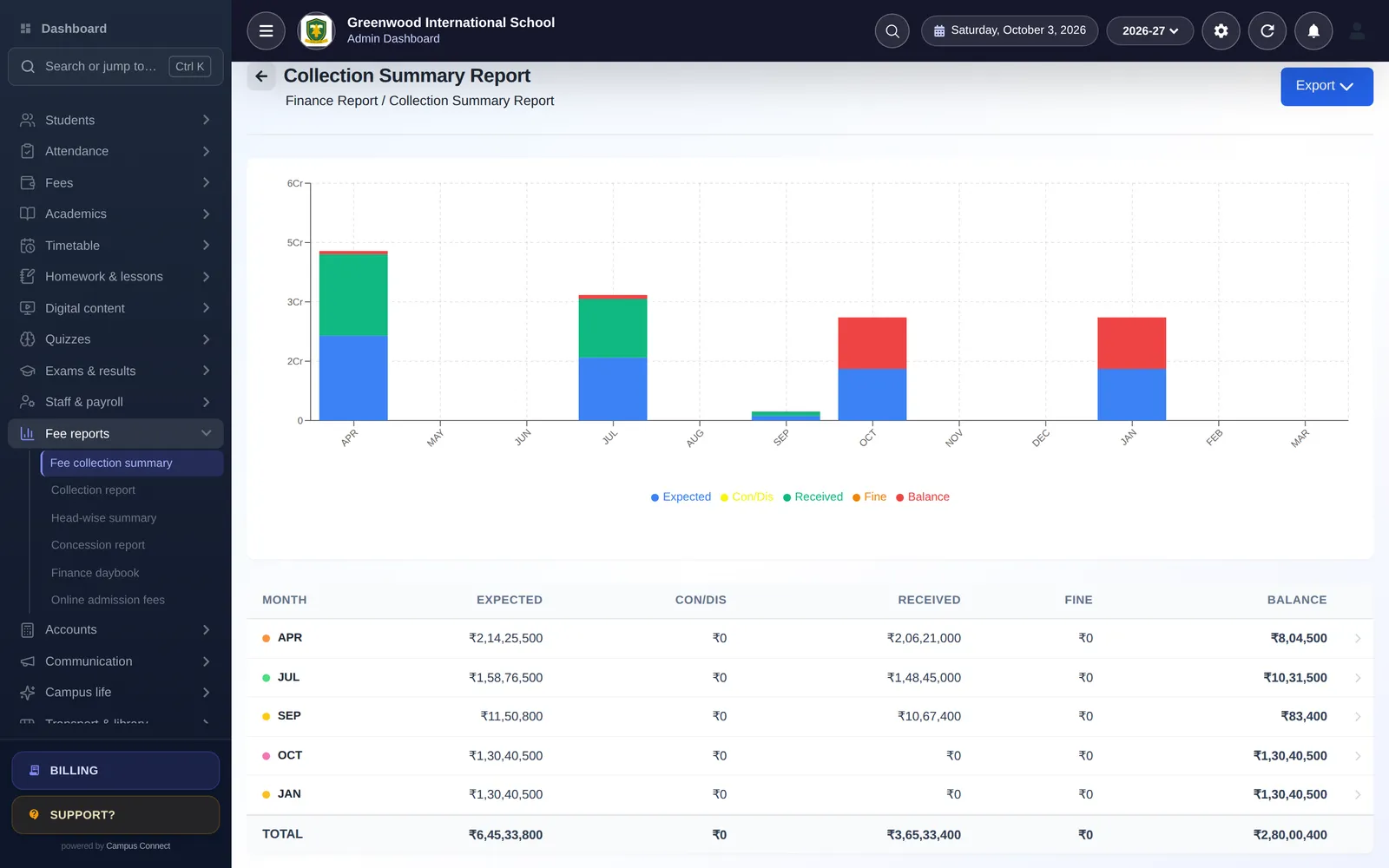
Fee collection summary: month-by-month expected, received and balance for the session

01 · Module group

Students & admissions

From the first enquiry to the alumni list, every student record in one place.

Admissions & Student 360

Take admissions online or at the desk, import whole classes from Excel and see everything about a student on one Student 360 page.

  • Online admission forms with configurable fields and online admission fees
  • Add students one by one or bulk-admit and bulk-update from Excel
  • Student 360 profile: attendance, fees, results, homework, health and documents together
  • Promote students to the next session; SmartDistribute balances new students across sections
  • Certificates (bonafide, transfer and more) from your own templates, plus an alumni register
  • Export student lists and ID details in one click
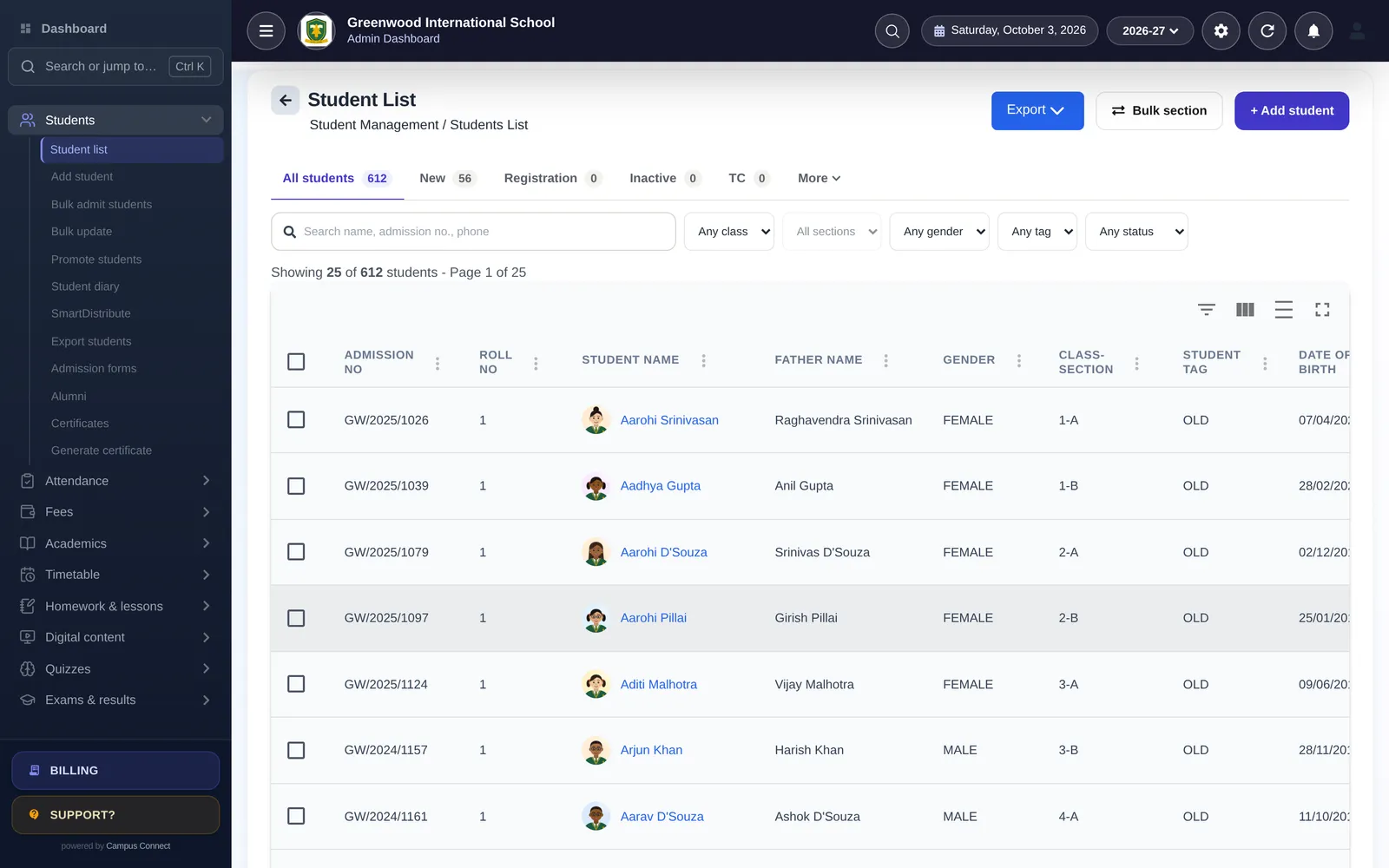
Student list in the CampusConnect web app with filters, tags and bulk actions

Attendance (incl. biometric)

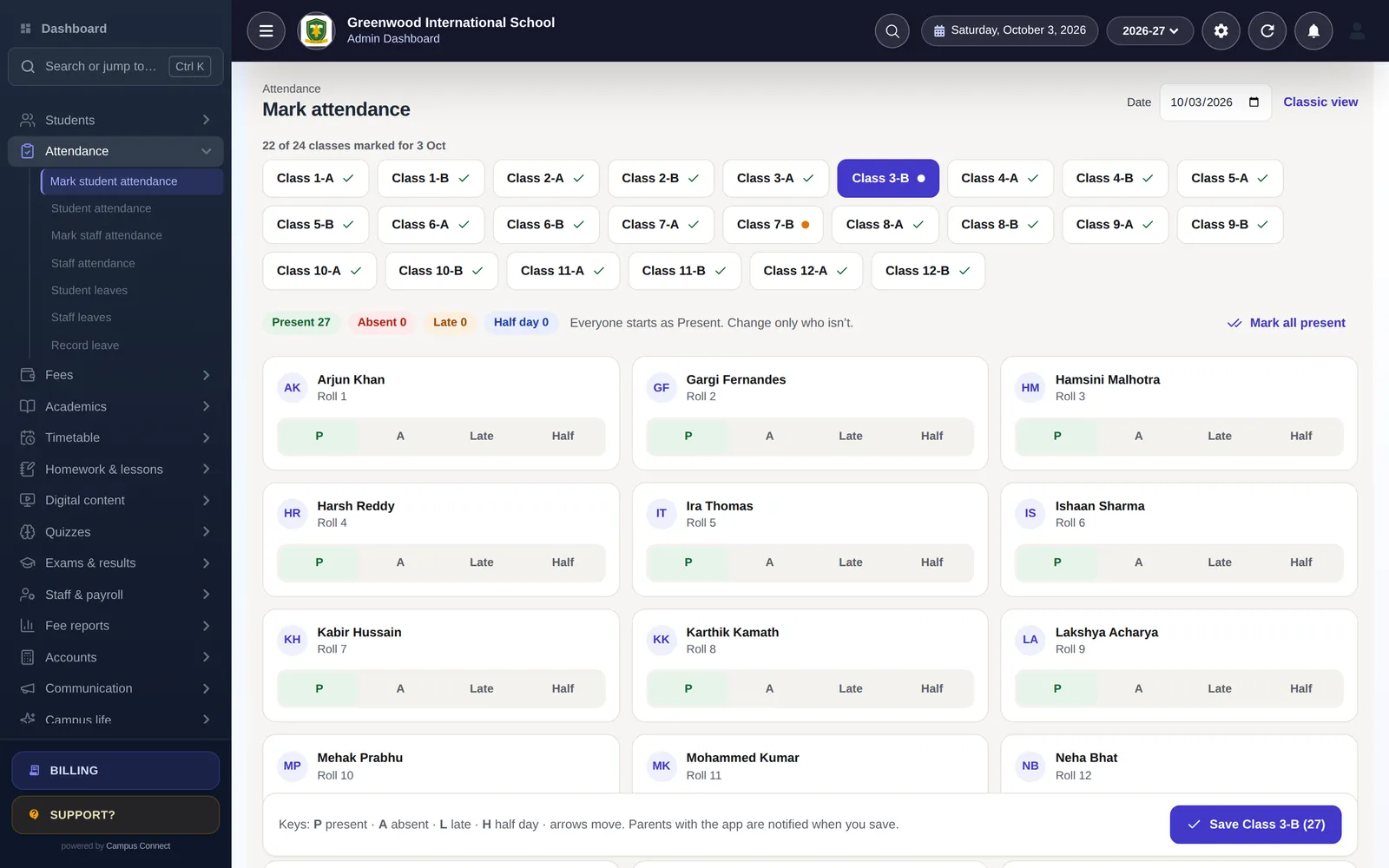
Teachers mark attendance from the web or the staff app; parents with the app are notified when it is saved.

  • Card-based marking: Present, Absent, Late, Half day, with keyboard shortcuts
  • Biometric / RFID device integration and settings for automatic attendance
  • Staff attendance, staff leaves and student leave requests with approvals
  • Monthly attendance reports by class, student and staff member
  • Attendance locking so saved records stay trustworthy
Mark attendance screen showing every student as a card with P, A, Late and Half buttons

02 · Module group

Fees & finance

Collect fees online, issue receipts instantly and keep proper books — without a separate accounting tool.

Fees & online payments

Set up fee heads and structures once, then collect at the counter or let parents pay online from the app.

  • Fee heads, class-wise structures, installments, fines and carry-forward dues
  • Online payments through the Easebuzz payment gateway, straight from the parent app
  • Discounts and concessions with a request-and-approve workflow
  • Due reports with reminders by SMS, email and push notification
  • Import existing fee masters, fee records and dues from Excel when you switch
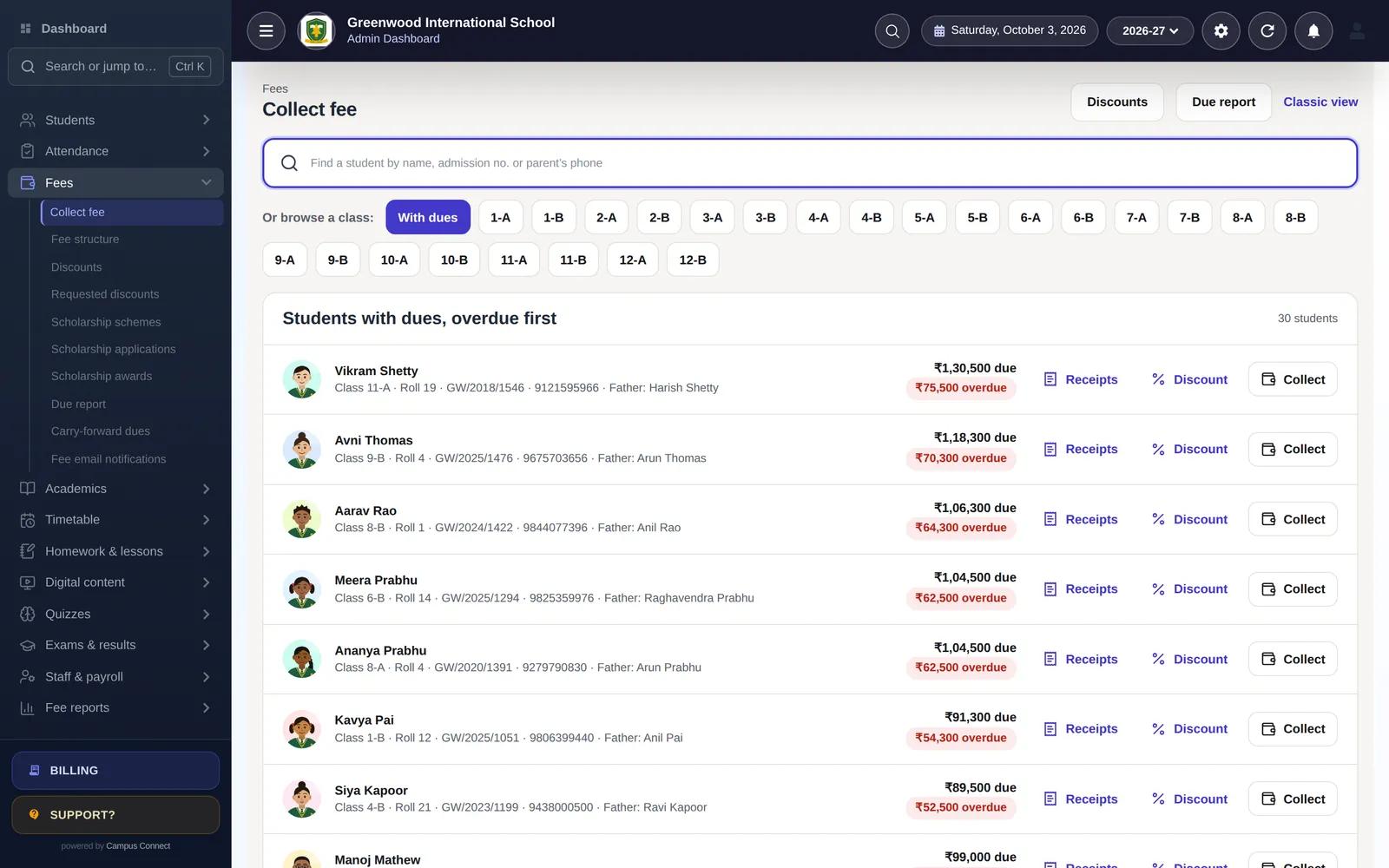
Collect fee screen with dues listed overdue-first and Collect, Receipts and Discount actions
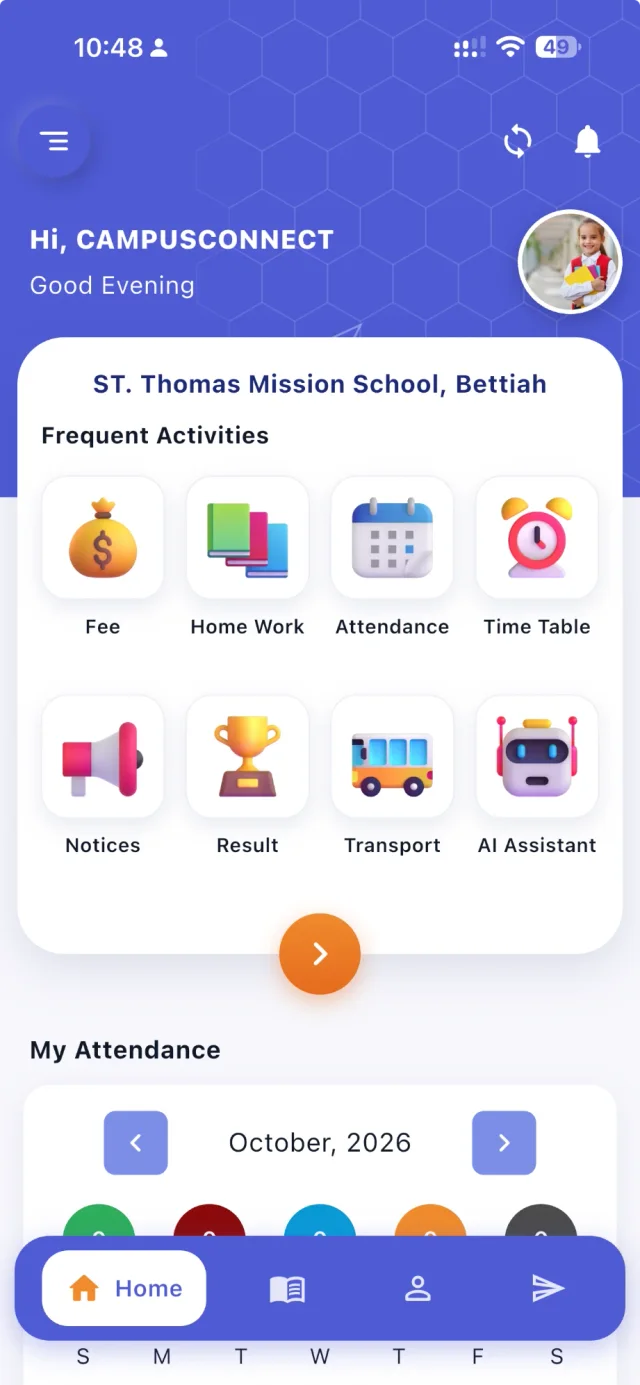
CampusConnect app home for a student: greeting, profile photo, frequent activities — Fee, Home Work, Attendance, Time Table, Notices, Result, Transport, AI Assistant — and My Attendance

Receipts & fee reports

Every payment produces a receipt that parents can open in the app, and every rupee shows up in your reports.

  • Printable and downloadable receipts with your school's branding
  • Collection report, head-wise summary, concession report and finance daybook
  • Revert a wrong receipt with a full audit trail
  • Fee email notifications and online admission fee tracking
Fee collection summary: month-by-month expected, received and balance for the session

Accounting

Fees, income, expenses and payroll post automatically to a double-entry ledger, so your accountant gets real financial statements.

  • Chart of accounts and opening balances
  • Automatic journal entries from fees, income, expenses and payroll, plus manual journals
  • Trial balance, profit & loss and balance sheet for any date range
  • Income and expense entry with an expense report
  • Export reports to Excel or PDF
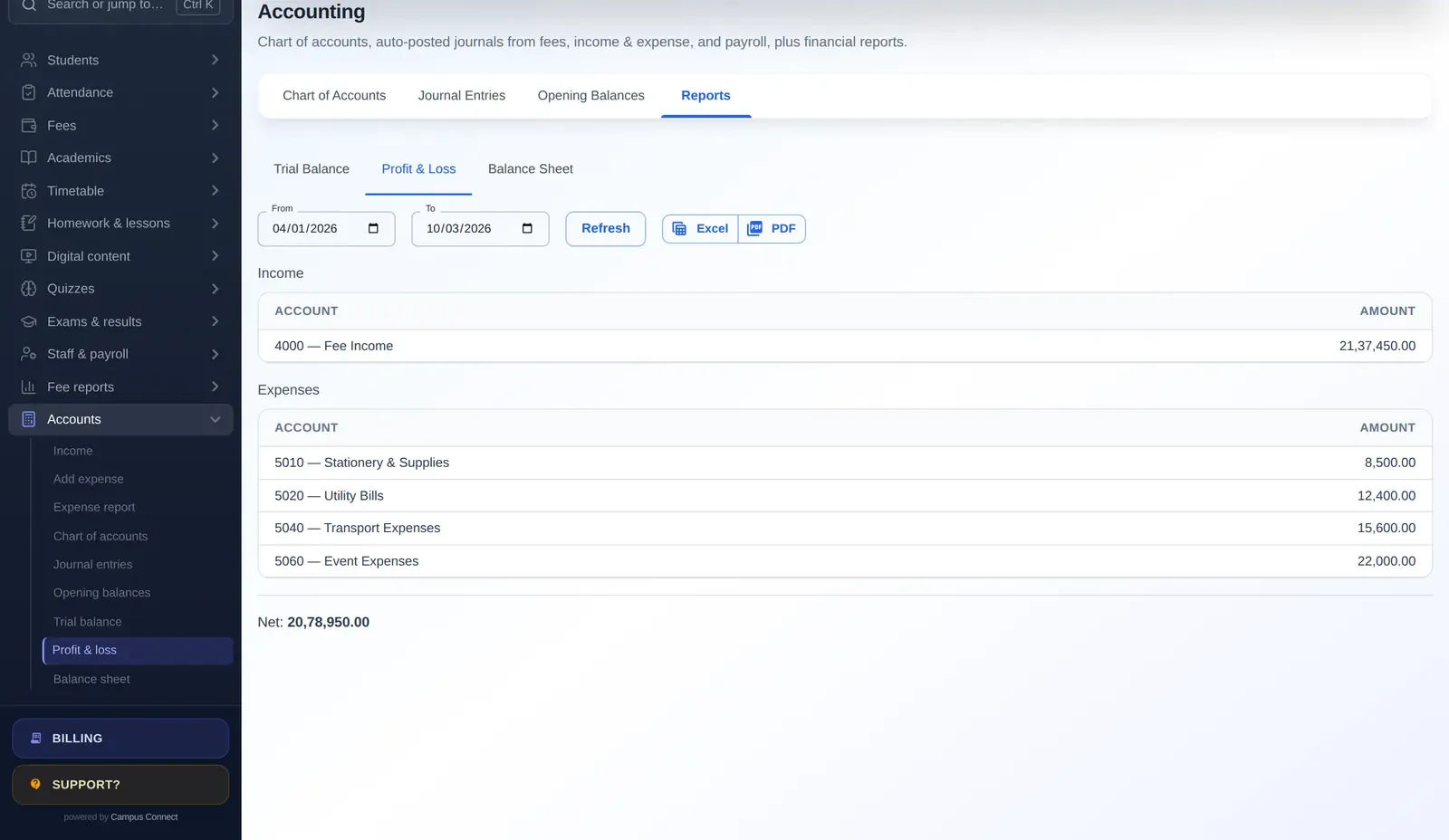
Profit and loss report showing fee income and expense accounts

Staff & payroll

Keep staff records, pay structures and leave in one place and run payroll every month in a few clicks.

  • Staff profiles with roles: teacher, accountant, librarian, receptionist and more
  • Pay structures with allowances and deductions
  • Monthly payroll runs that account for leave, with payslip templates
  • Staff can view their payslips and attendance in the staff app
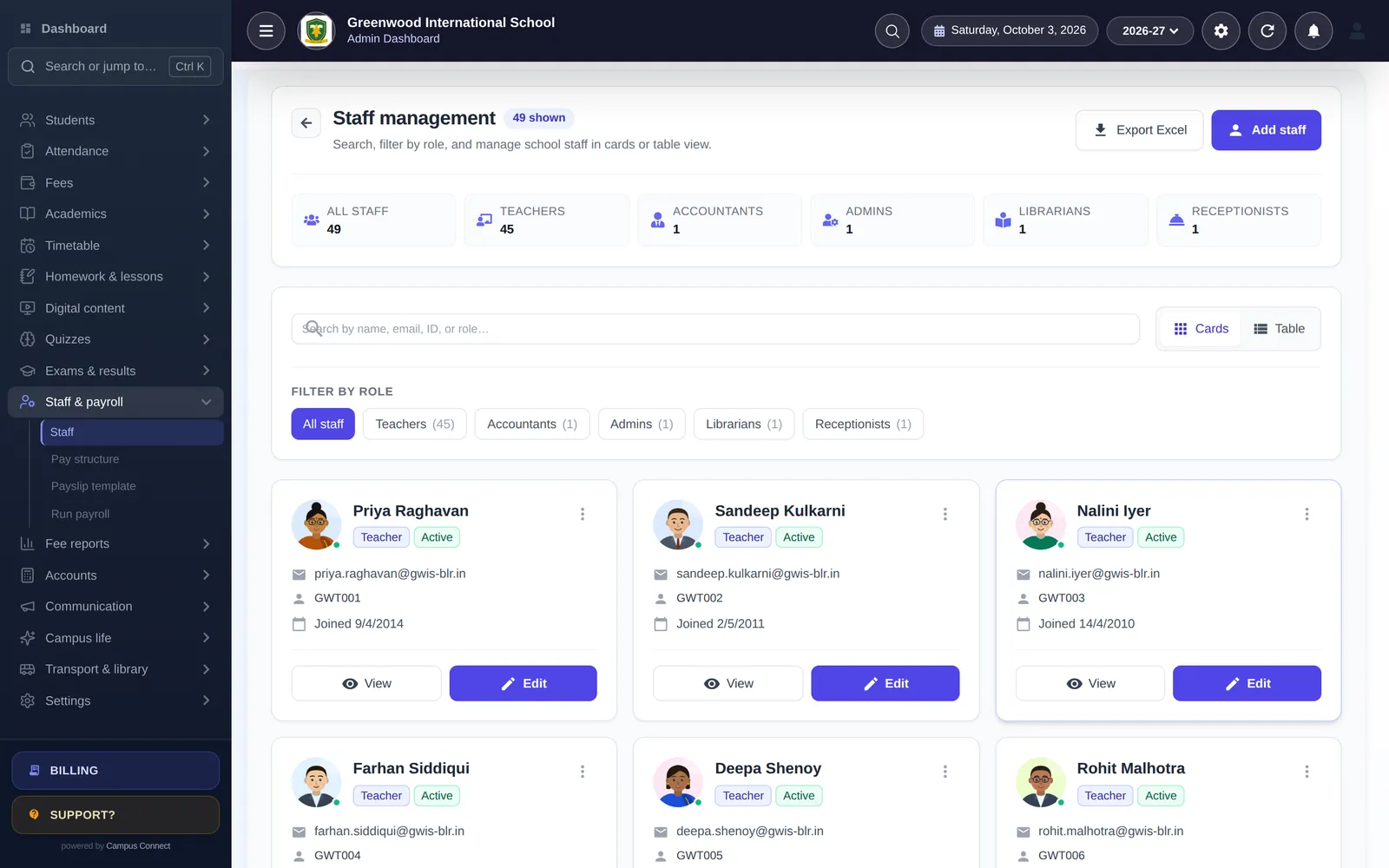
Staff management: every teacher and staff member with photo, role, status and joining date

Scholarships

Run merit and need-based scholarships end to end, including applications from the parent app.

  • Scholarship schemes with eligibility and amounts
  • Students and parents apply from the app and track their application
  • Review, approve and award — awards flow into the student's fees
  • Scholarship awards report, with revoke if needed
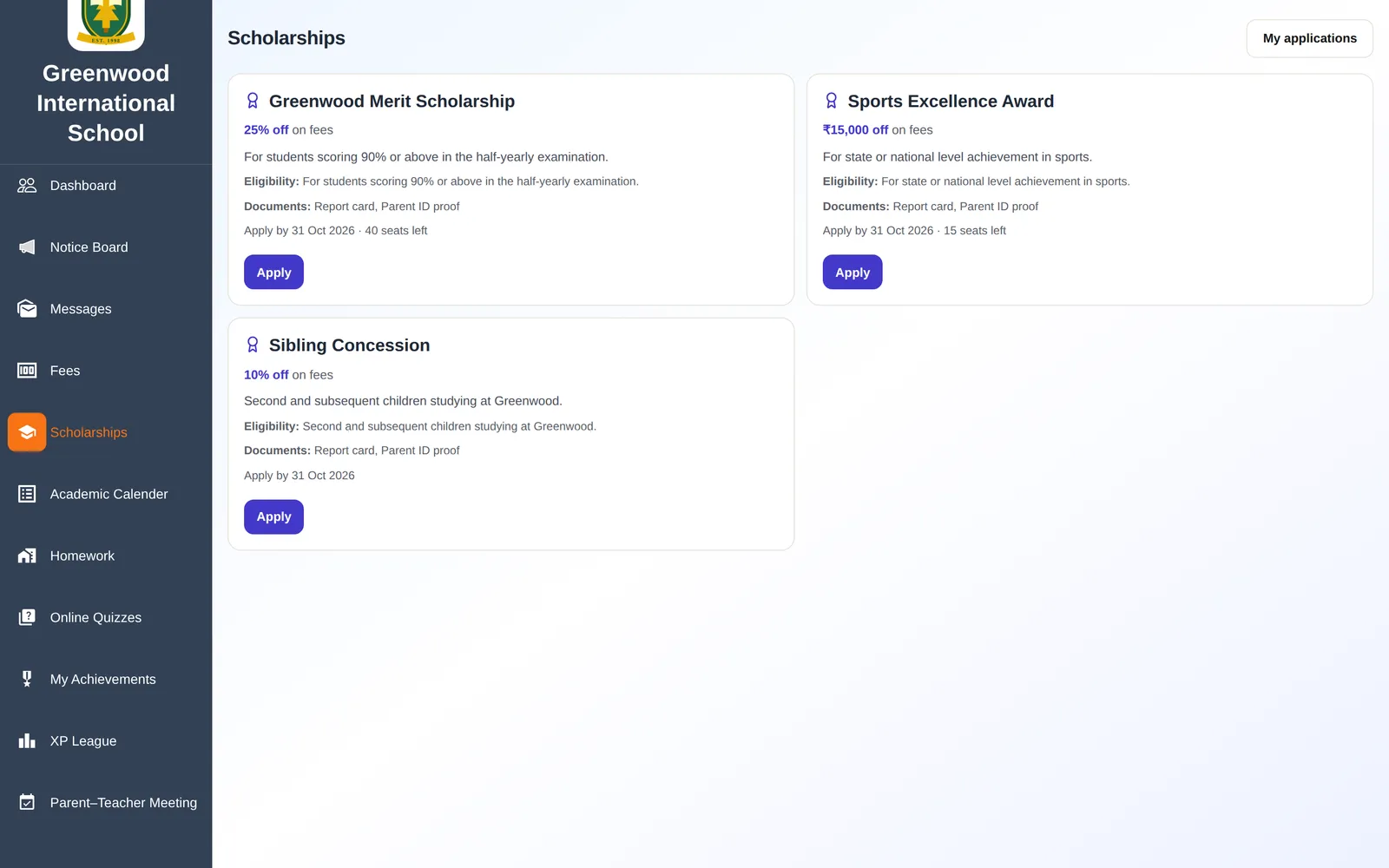
Open scholarship schemes with eligibility, documents and seats left, applied for online

03 · Module group

Academics

Plan the year, run classes and publish results with less paperwork.

Exams & report cards

Set up exams, let teachers enter marks and publish results to students and parents.

  • Exam heads, schedules and admit cards
  • Mark entry by subject, with grades and co-scholastic areas (behaviour and skills)
  • Configurable result tables and printable report cards
  • Results visible in the student and parent app once published

Timetable & automatic generator

Define working days, periods and breaks, set teacher availability and generate a timetable where no teacher is ever in two classes at once.

  • Class and staff timetables, visible to students, parents and teachers
  • Automatic timetable generator: days and periods, classes and subjects, teacher availability, then preview
  • Rules such as max periods per day per subject and per teacher
  • Double periods never run across a break
  • Academic calendar with events and holidays
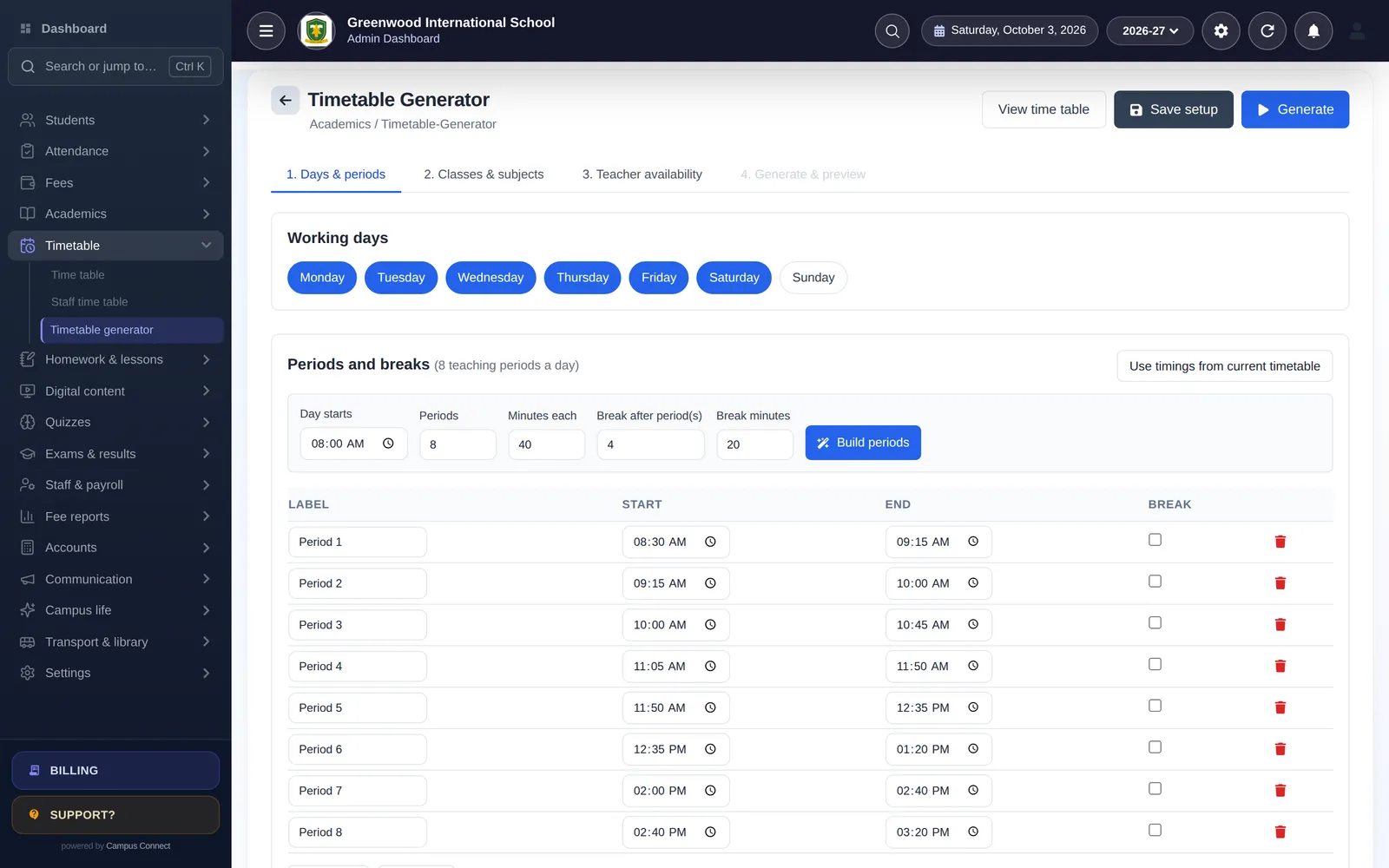
Timetable generator with working days, periods and breaks

Homework & lesson plans

Teachers assign homework from the web or the app, students submit, and teachers evaluate with feedback.

  • Homework with attachments, due dates and online submission
  • Evaluate submissions and track completion and average score
  • Lesson plans with status tracking for the principal
  • Student diary for daily notes to parents
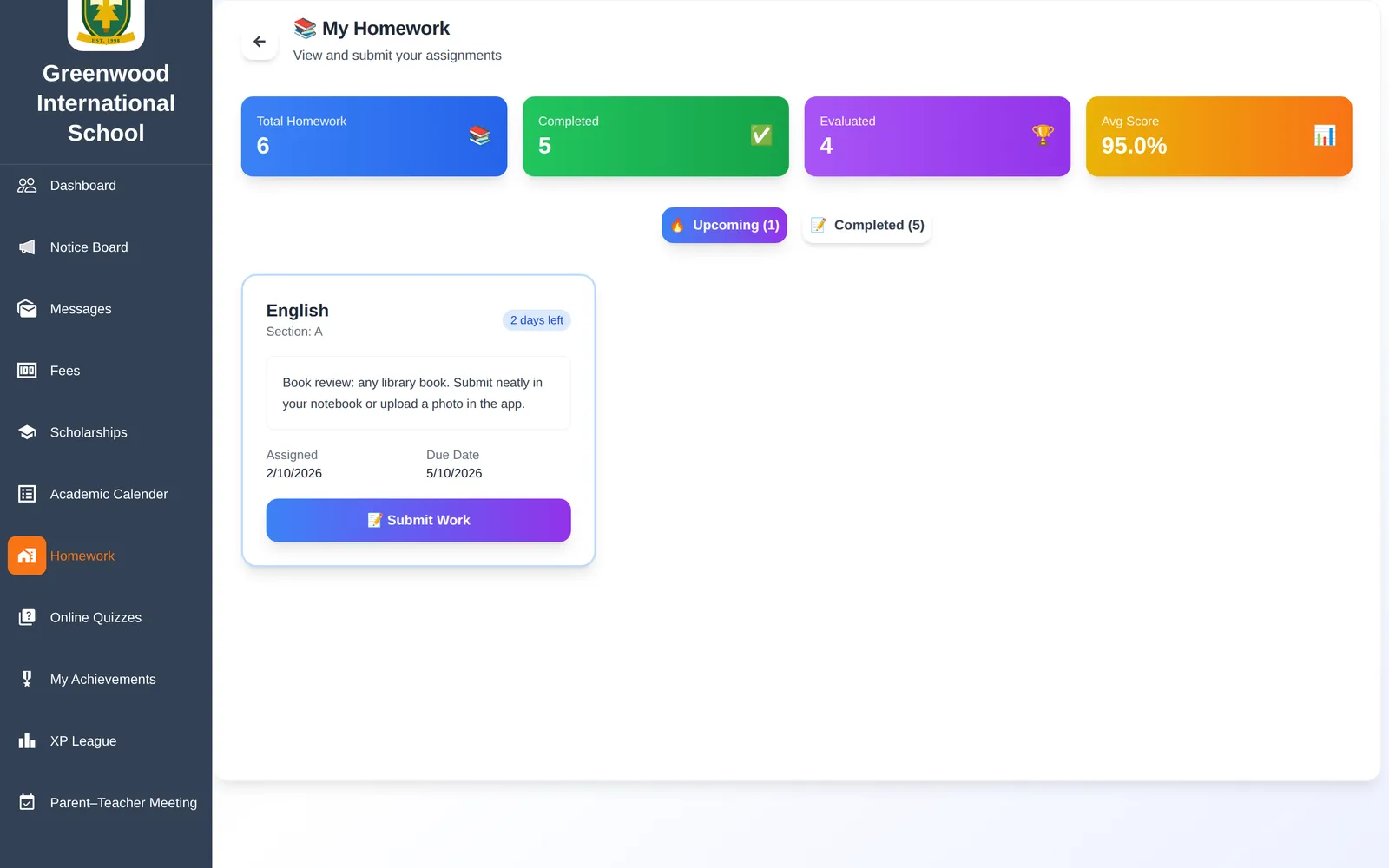
Homework: assigned and completed work with marks, average score and online submission

Digital content

Upload learning material once and share it with the right classes and subjects.

  • Notes, PDFs, images and video links organised by class and subject
  • Students view content in the app
  • Extra-curricular activities with grades

04 · Module group

Quizzes & gamification

Practice that students actually want to do.

Online quizzes

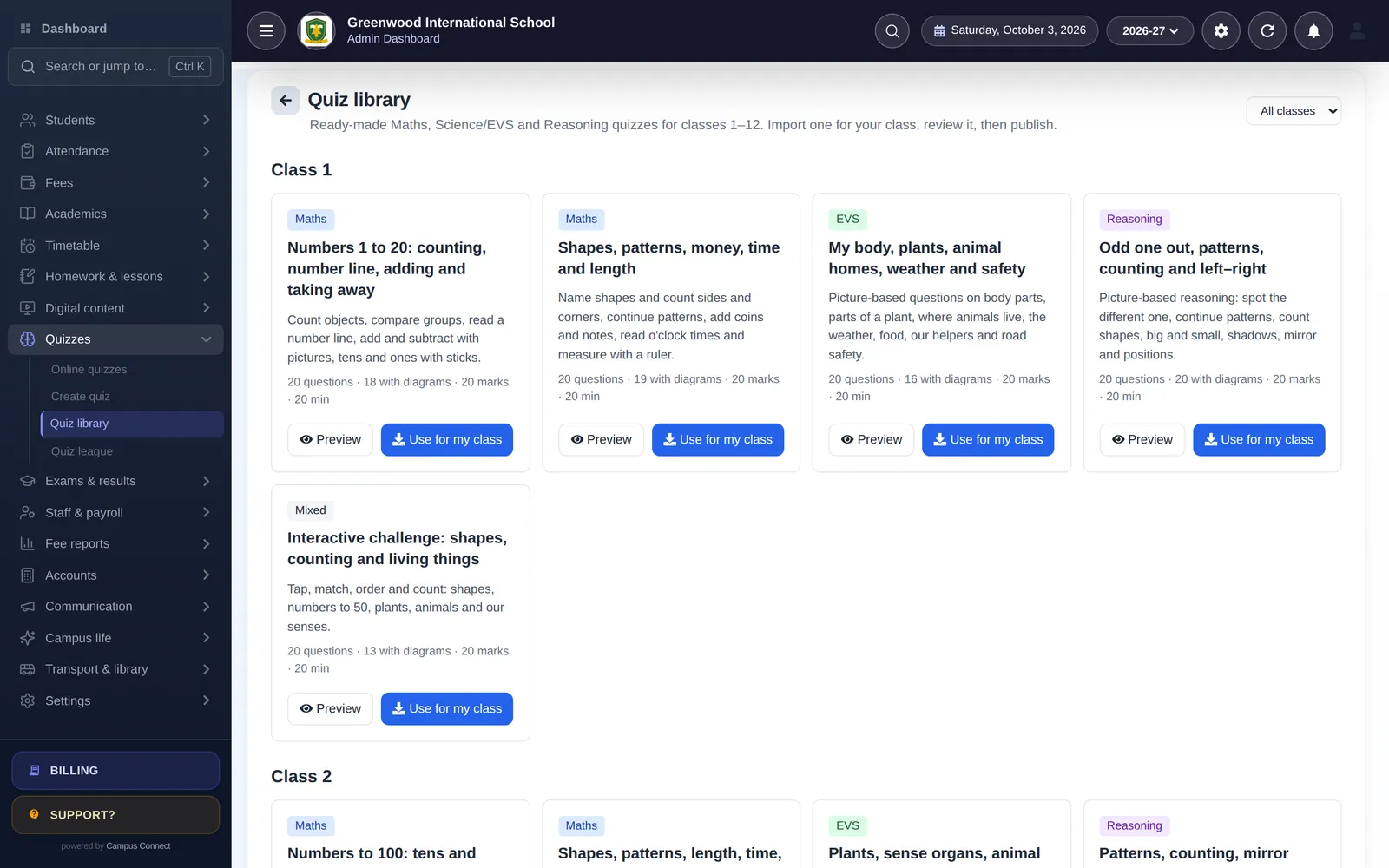
Create your own quizzes or start from the built-in library: 60 ready-made sets for classes 1–12 in Maths, Science/EVS, Reasoning and interactive challenges — most questions come with a diagram.

  • Ready-made library: 20 questions per set, previewed and imported as a draft for your class
  • Interactive question types: tap on the diagram, match pairs, put in order, number answers and multiple choice
  • Instant feedback with explanations, or results after the quiz closes
  • Schedule quizzes with open and close times; see results and leaderboards per quiz
  • Teachers create and edit quizzes from the web or the staff app
Quiz library listing ready-made Maths, EVS, Reasoning and interactive quizzes for Class 1
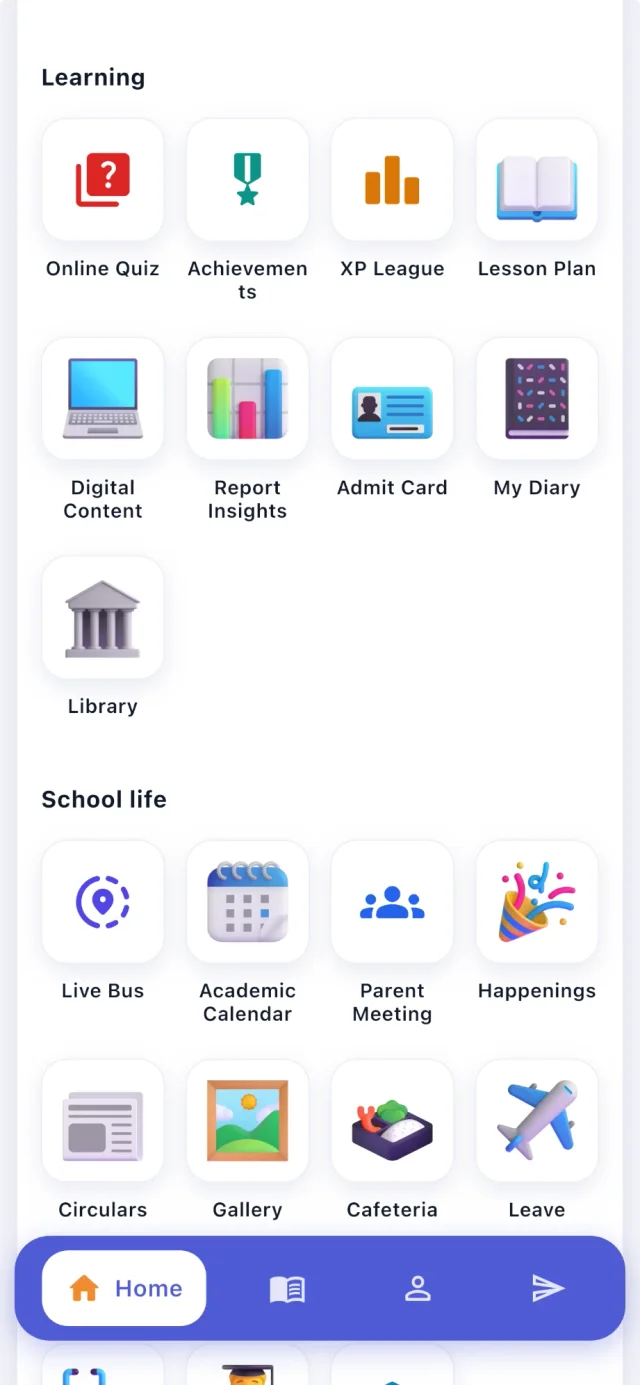
CampusConnect app menu: Learning (Online Quiz, Achievements, XP League, Lesson Plan, Digital Content, Report Insights, Admit Card, My Diary, Library) and School life (Live Bus, Academic Calendar, Parent Meeting, Happenings, Circulars, Gallery, Cafeteria, Leave)

Gamification

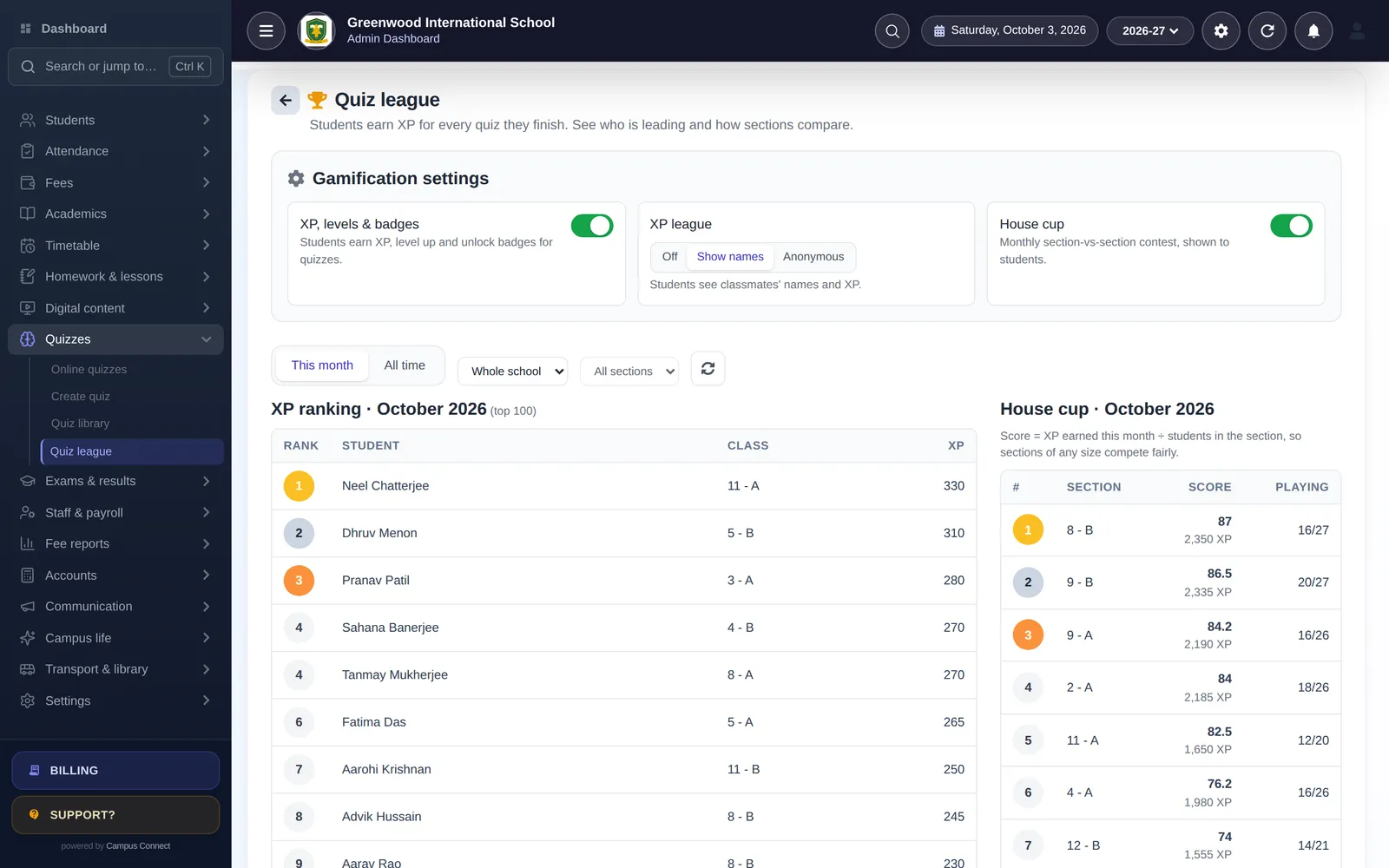
Every quiz earns XP. Students level up, unlock badges, keep streaks and compete in a class and school league — with a fair, section-based House Cup.

  • XP for score, stars, correct answers in a row, speed and first quiz of the day
  • Levels, 18 badges and daily/weekly streaks
  • Class and school XP league — with names, anonymous, or turned off
  • House Cup: sections compete on XP per student, so small and big sections have a fair chance
  • Admins control every setting from Quiz league
Admin quiz league screen with gamification settings, XP ranking and House Cup

05 · Module group

Communication & parents

Keep every parent informed without a dozen WhatsApp groups.

Parent–teacher meetings

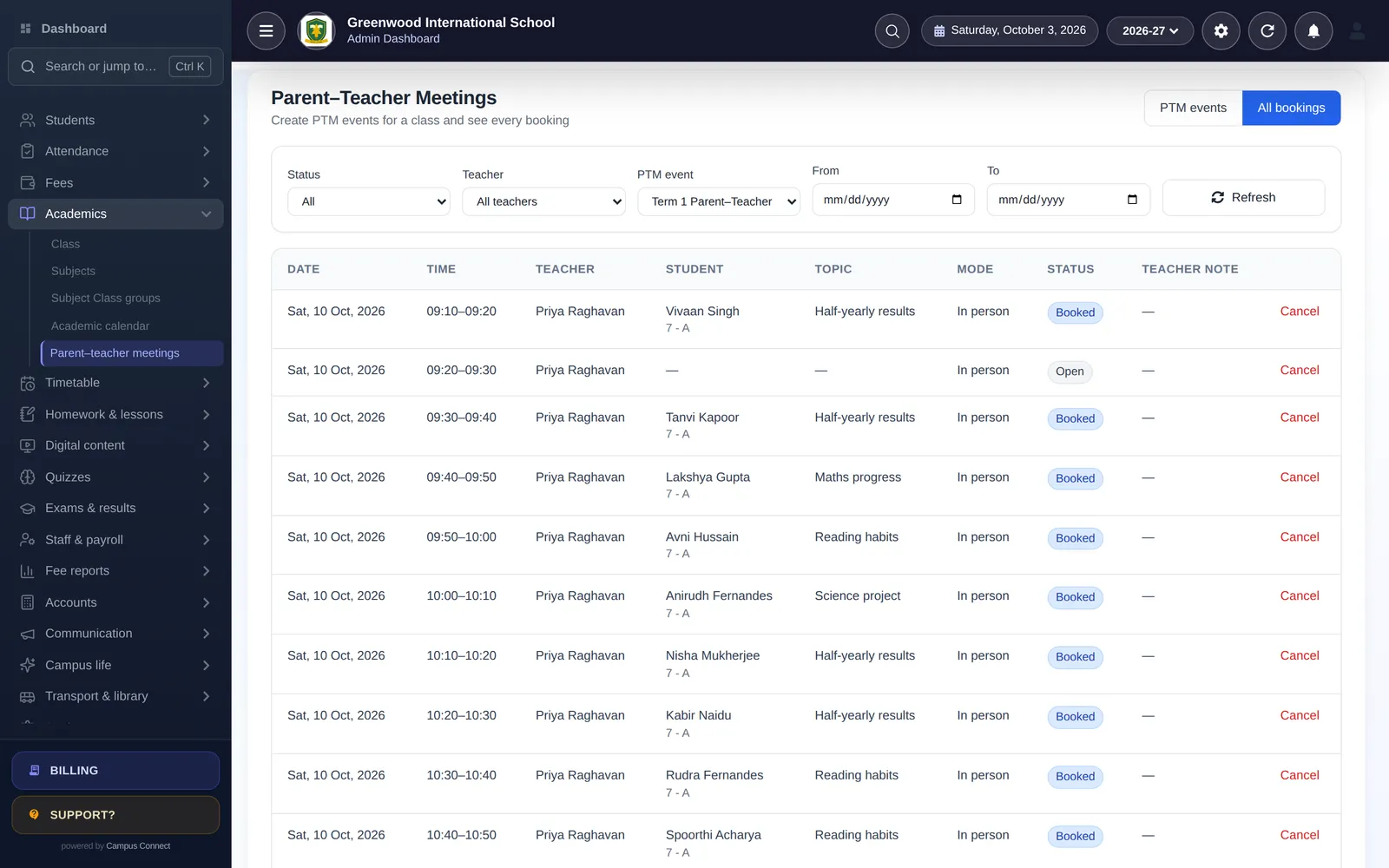
No more phone tag: teachers publish meeting slots and parents book a time that suits them.

  • Publish PTM slots per teacher and class
  • Parents book, view and cancel from the app
  • Upcoming and past meetings at a glance
PTM bookings with time slot, teacher, student and topic

Notices, SMS & push

Reach the right audience instantly on the channel they actually read.

  • Notice board and circulars with attachments
  • Bulk SMS to classes, sections or individuals
  • Push notifications to the parent and staff apps
  • App banners and in-app happenings

Messaging

Keep school conversations inside the school's own platform.

  • Class-wise chat rooms created automatically
  • Messages between teachers, students and parents
  • School controls who can message whom

Forms

Consent forms, surveys and registrations without paper.

  • Form builder with form users and permissions
  • Responses collected and exported in one place

Campus life

Give parents a window into school life.

  • Photo gallery and happenings feed
  • Cafeteria menu so parents know what's for lunch
  • Health records for every student
  • AI assistant in the parent app that answers questions like “Was my child present today?” (where enabled)

06 · Module group

Transport, library & operations

The day-to-day running of a campus.

Live bus tracking

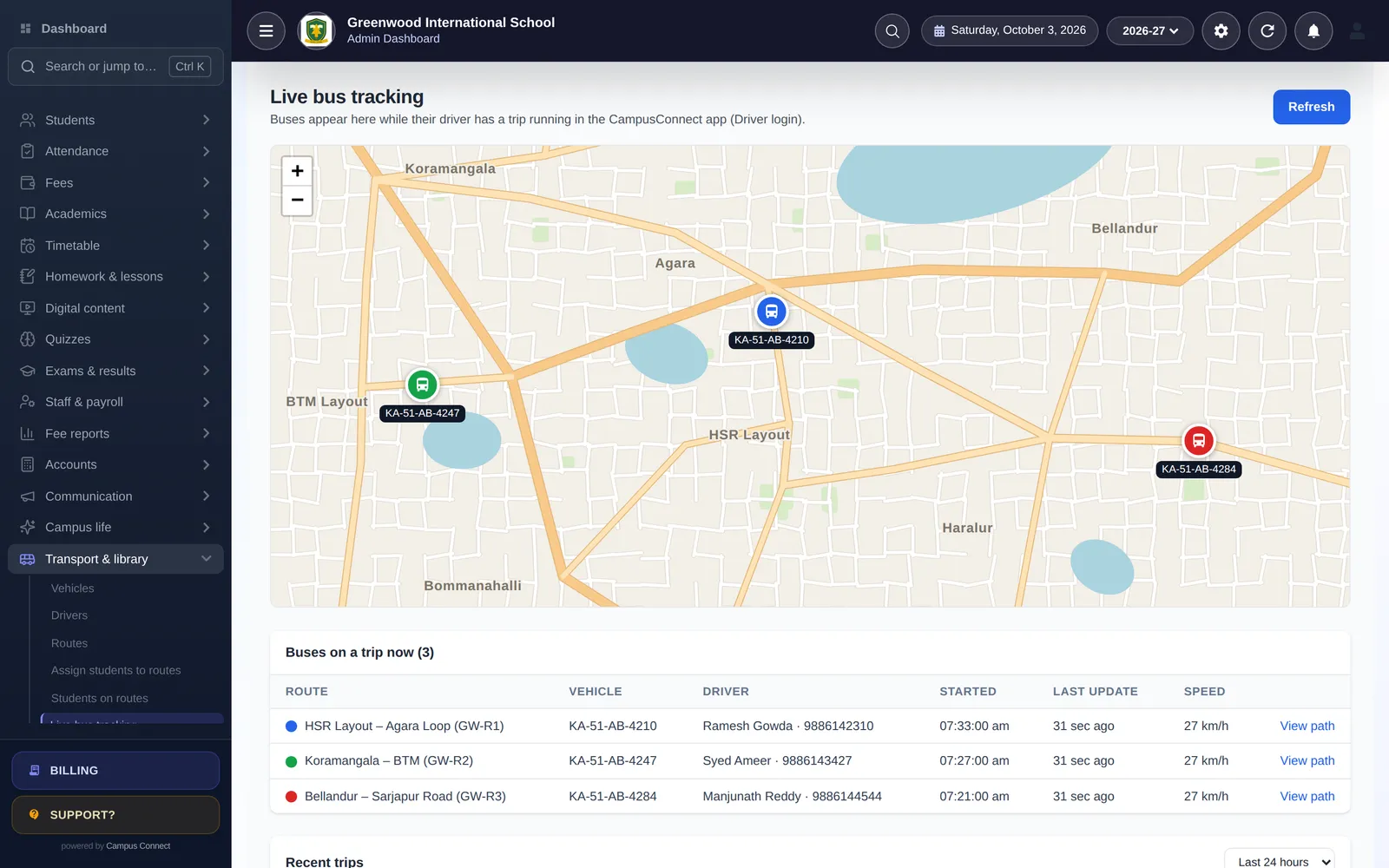
Drivers start a trip in the CampusConnect app and the bus appears live for parents on that route and for the school on one map.

  • Driver login with school code, mobile number and OTP
  • Live bus location for students and parents on the route
  • Admin live map of all buses on a trip, plus recent trips and trip replay
  • Vehicles, drivers, routes and stops; assign students to routes
Live bus tracking map with three buses on their routes, plus driver, start time, last update and speed

Library

Run the school library without a separate system.

  • Book catalogue
  • Student and staff members
  • Issue, return and history
  • Students see their issued books in the app

Multi-school & resellers

Built to run many schools from one platform, each with its own data, branding and domain.

  • Each school gets its own login page, logo and optional custom domain
  • Platform-level management for school groups and reseller partners
  • Billing and invoices per school

Security & control

Your school's data stays private and every important change is traceable.

  • Role-based access for admins, teachers, accountants, librarians and more
  • Audit log of important actions
  • OTP login by SMS for mobile users and limits on failed login attempts
  • Encrypted connections (HTTPS) for the web app and mobile apps
  • Session-wise data: each academic year kept separately

How it connects

One student record, every module

Follow one student from admission to the parent's phone.

Choose a step of the school journey

1Step 1 of 6 · Admission

Student list with photos, admission numbers, class-section and tags, with search and filters

A new student joins

The family fills the online admission form — or the office adds the student, or bulk-admits a whole class from Excel. A Student 360 profile is created once and used everywhere.

  • Online admission forms and admission fees
  • Bulk admit and bulk update from Excel
  • Student 360: one profile for every module

2Step 2 of 6 · Fee collection

Collect fee screen: dues listed overdue-first with Collect, Receipts and Discount actions
CampusConnect app home for a student: greeting, profile photo, frequent activities — Fee, Home Work, Attendance, Time Table, Notices, Result, Transport, AI Assistant — and My Attendance

Fees are set up and collected

The class fee structure applies automatically. Parents see what is due in the app and pay online; the receipt is generated instantly and the payment lands in your fee reports and accounts.

  • Fee heads, installments, fines and concessions
  • Online payment in the parent app
  • Receipts, due reports and daybook update instantly

3Step 3 of 6 · Attendance

Mark attendance: class chips show which sections are done; every student starts Present

Attendance is marked in seconds

Teachers mark the class on the web or the staff app — or attendance comes in from biometric/RFID devices. Parents with the app are notified when attendance is saved.

  • Card-based marking with keyboard shortcuts
  • Biometric / RFID device integration
  • Monthly reports by class, student and staff

4Step 4 of 6 · Exams & marks

Illustration

Exams are scheduled and marks entered

Set up exam heads and schedules, issue admit cards and let each subject teacher enter marks — with grades and co-scholastic areas.

  • Exam heads, schedules and admit cards
  • Subject-wise marks entry by teachers
  • Grades and co-scholastic areas

5Step 5 of 6 · Report card

Illustration

Results and report cards are published

Configurable result tables turn marks into printable report cards. Once you publish, results appear for students and parents in the app.

  • Configurable result tables
  • Printable report cards
  • Results visible in the app once published

6Step 6 of 6 · Parent app

  • Attendance savedAarav is marked Present today.
  • Receipt readyExam fee paid online — receipt is in the app.
  • New notice from schoolParent–teacher meeting slots are open. Book a time.
CampusConnect app home for a student: greeting, profile photo, frequent activities — Fee, Home Work, Attendance, Time Table, Notices, Result, Transport, AI Assistant — and My Attendance

Parents stay in the loop

Attendance, fees and receipts, notices, homework, results, meetings and the live school bus — everything the school records shows up in the parent app.

  • Notified when attendance is saved
  • Push notifications for notices
  • Receipts, results and homework in one app

Integrations

Integrations built into the platform

Every integration listed here exists in the product today.

  • Payments

    Easebuzz payments

    Parents pay fees online from the app through the Easebuzz gateway; the school's gateway keys are stored encrypted and payment status is confirmed with Easebuzz.

  • Messaging

    SMS gateway

    Bulk SMS to classes and individuals, plus OTPs for mobile login — through a configurable SMS provider (AuthKey.io; 2Factor for OTP).

  • Messaging

    Push notifications

    Notifications to the parent and staff apps via Firebase Cloud Messaging and Novu, and browser notifications via Web Push.

  • Messaging

    Email

    Fee e-mail notifications, OTP e-mails and daily fee-collection summaries.

  • Attendance

    Biometric & RFID devices

    Attendance from biometric and RFID devices is synced into student and staff attendance.

  • Transport

    OpenStreetMap

    Live bus locations and trip replays are shown on OpenStreetMap maps in the web and mobile apps — no separate GPS hardware needed.

  • Storage

    Cloudinary & Amazon S3

    School media and documents can be stored on Cloudinary or Amazon S3, including a school's own storage account.

  • Data

    Excel import & export

    Bulk-admit students and import fee masters, fee records and dues from Excel; export lists and reports to Excel or PDF.

Why switch

CampusConnect vs registers and legacy software

CampusConnect compared with registers and spreadsheets and with typical legacy ERP software
Registers & spreadsheetsExcel, paper, WhatsApp groupsTypical legacy ERPDesktop or office-bound softwareCampusConnectWeb + Android + iOS
Daily operations
Fee collection & receiptsManual entries, hand-written receiptsAt the office counterAt the counter or online in the parent app, with instant receipts
AttendanceRegisters, re-typed into sheetsDesktop entry, often end of daySeconds per class on web or phone; biometric/RFID sync
TimetableBuilt by hand every term PartlyAutomatic generator with teacher availability and rules
Accounting from feesOften a separate packageFees, expenses and payroll post to the ledger automatically
Parents & students
Parent app PartlyAttendance, fees, homework, results, notices, meetings, live bus
Online quizzes & practice60 ready-made sets for classes 1–12, plus your own quizzes
Live bus trackingSeparate GPS hardwareDriver's phone shares location — no extra device
Control & growth
Role-based access
Audit log of important actions Partly
Updates and new features—Upgrades and reinstallsDelivered continuously on the web; app updates on phones
Multiple schools / branchesOne file per branch PartlyMany schools on one platform, each with its own data

Get started

Want to see a module in action?

We'll walk you through the modules you care about, using sample data that looks like your school.

  • Personalised demo, at a time that suits you
  • Help importing your data from Excel
  • Training for admins, accountants and teachers
  • +91 95382 22239WhatsApp support
Book a free demo