For partners & resellers
Bring a complete school platform to the schools you serve
Reseller accounts let you set up and manage your own schools on CampusConnect — each with its own data, branding and login page — backed by our product and support team.
From → to
The problems we hear most — and what changes
Today
Your schools need an ERP, but building and maintaining one isn't your business.
With CampusConnect
A complete, continuously updated platform — web app plus Android and iOS apps — ready to offer.
Today
Every school wants its own identity.
With CampusConnect
Per-school login page and logo, with an optional custom domain.
Today
You need control without seeing other partners' schools.
With CampusConnect
Reseller accounts see and manage only the schools they own, within agreed limits on schools and students.
Today
Onboarding each school takes too long.
With CampusConnect
Excel imports, guided setup and our onboarding support for your first schools.
See it
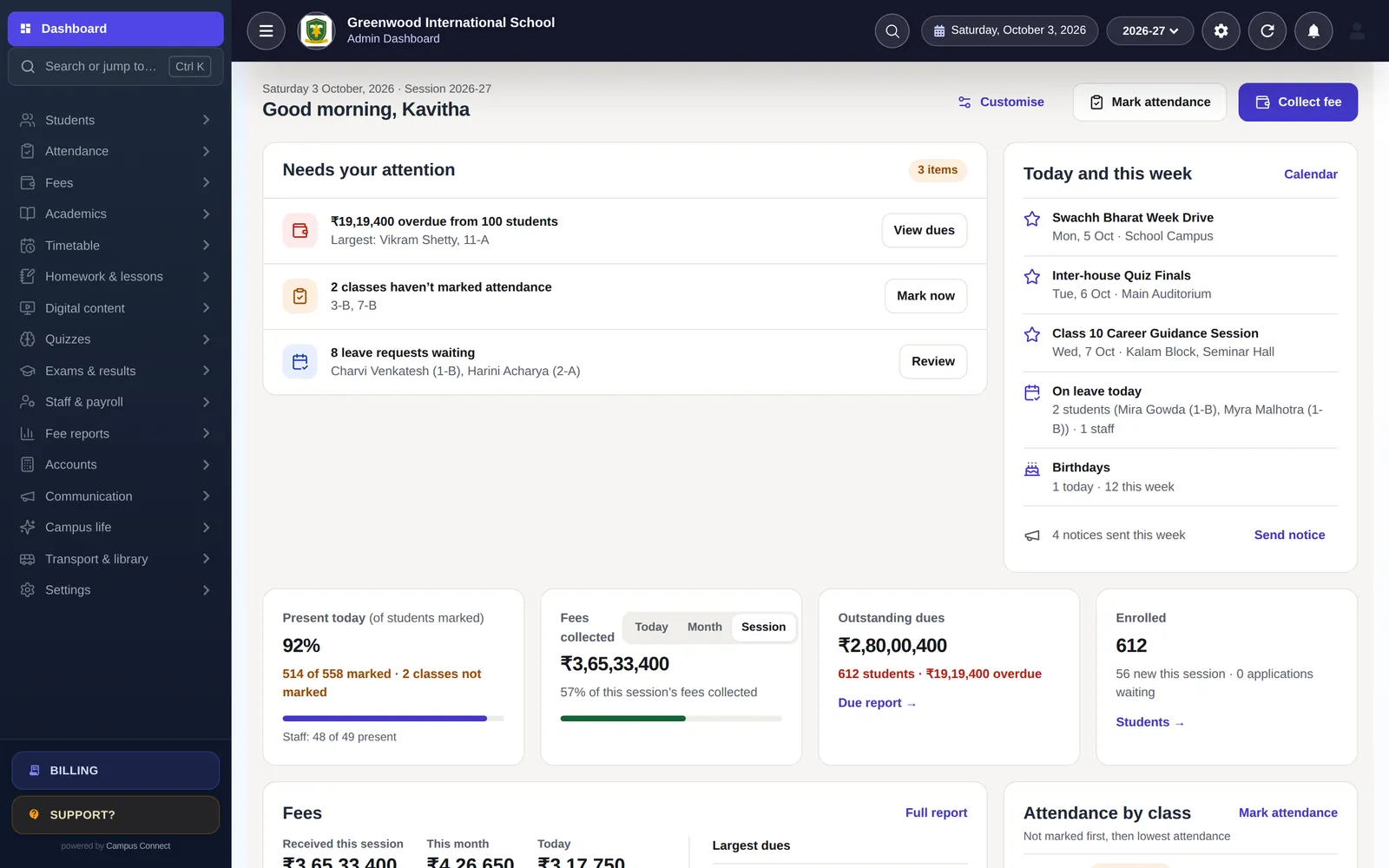
CampusConnect for Partners & resellers, screen by screen
Every school you onboard gets the full platform
Dashboards, fees, attendance, exams and the parent app — from day one.
- Full module set
- Separate data per school
- Same apps for every family
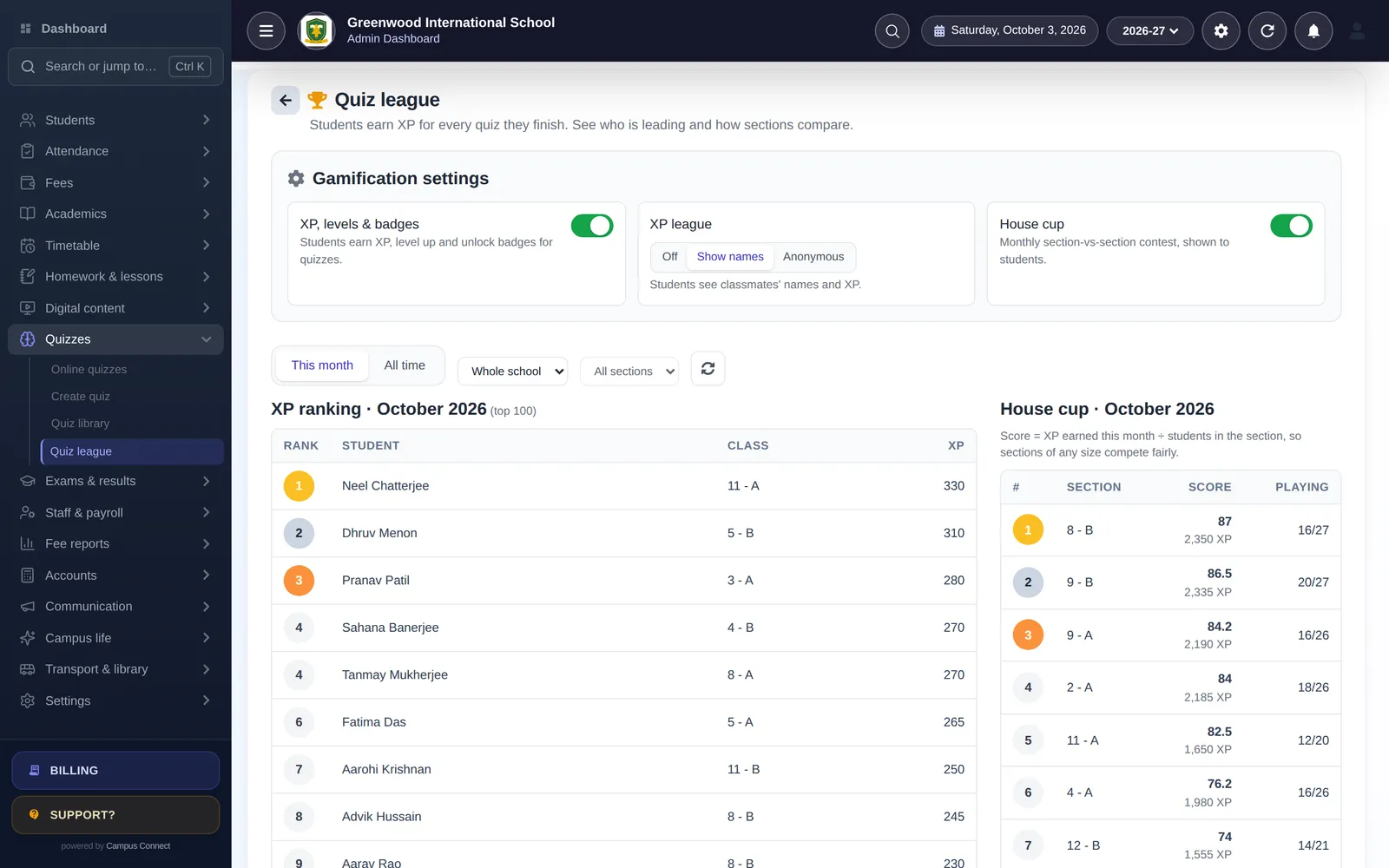
Differentiators schools notice
Ready-made quizzes, gamification and live bus tracking help your offer stand out.
- 60 ready-made quiz sets
- XP, badges, House Cup
- Live bus tracking
Modules
The modules that matter most here
- Multi-school & resellersRun a group of schools or resell CampusConnect under one platform.
- Fees & online paymentsFee structures, discounts, dues and online payment through the Easebuzz gateway.
- Attendance (incl. biometric)Mark a class in seconds, connect biometric/RFID devices and notify parents.
- Exams & report cardsExam heads, mark entry, results and printable report cards.
- Online quizzes60 ready-made, diagram-based quiz sets for classes 1–12 and interactive question types.
- Live bus trackingDriver app shares GPS; parents see the bus live; admins see every bus.
- Security & controlRole-based access, audit log, OTP login and login-attempt limits.
By role
What changes for each person
Partner owner
- Create and manage your schools
- See only your own schools
- Limits agreed per partnership
Your implementation team
- Excel imports and guided setup
- Our guides and help centre
- Escalation to our product team
Your schools
- Own login page and logo
- Optional custom domain
- Web app plus Android and iOS apps
Implementation
How you go live
A typical plan for one institution starting with the core modules.
Week 0
Kick-off
Demo, scope and a go-live date. We agree which modules you start with and who does what.
Days 1–3
School setup
School code, logo, session, classes, subjects, staff roles and fee structures — configured with you.
Days 3–7
Data migration
Students, staff, fee masters, fee records and pending dues imported from Excel and checked together.
Days 7–10
Training
Short, role-wise sessions for the office, accountants and teachers — on the web app and the staff app.
Days 10–14
Go live
Parents download the app, online payments are switched on, and we stay close through the first fee cycle.
Security & trust
Built to protect children's and families' data
Schools trust us with sensitive records. Here is how the platform protects them — described plainly, and only what we can show in our code.
Visit the trust centreRole-based access
Admins, staff, students, parents and drivers each see only what their role allows.
Each school's data kept separate
Requests are scoped to the caller's school — covered by automated tests.
Encrypted in transit
HTTPS everywhere; passwords stored only as bcrypt hashes.
Login protection
OTP sign-in and limits on failed login and OTP attempts.
Audit log
Important actions recorded with who, when and from where.
Privacy by design
No ads, no data selling. Designed with India's DPDP Act in mind.

How do reseller accounts work?
A reseller account is a platform-level account that can create and manage its own schools. It only sees the schools it owns, within limits on the number of schools and students agreed with us.
Can schools carry their own branding?
Yes — each school has its own login page and logo, and can use a custom domain.
Who supports the schools?
We agree the support model with each partner: typically the partner handles first-line support and onboarding, with our team behind you for product questions and issues.
How do we start?
Book a call with our team. We'll walk you through the platform, commercial options and the onboarding of your first schools.
Other solutions
Get started
Become a CampusConnect partner
Tell us about the schools you work with and we'll set up a partner walkthrough.
- Personalised demo, at a time that suits you
- Help importing your data from Excel
- Training for admins, accountants and teachers
- +91 95382 22239WhatsApp support