
Short, frequent practice is one of the most reliable ways to help students remember what they learn. Online quizzes make that practice easy to set, quick to mark and useful to analyse. For schools following NCERT textbooks, a quiz after each chapter or topic is a simple habit with a big payoff.
This article covers when to use quizzes, how to design them and how to turn results into better teaching.
Why short quizzes work
Retrieving information from memory — rather than re-reading it — strengthens learning. A quick quiz a day or two after a lesson asks students to recall what they learned, shows them what they’ve forgotten, and gives the teacher a picture of the whole class.
Online quizzes add three practical benefits:
- Automatic marking, so teachers don’t spend evenings checking practice sheets.
- Instant feedback, so students learn from mistakes while the topic is fresh.
- Class-level data, so teachers see which questions most students got wrong.
When to quiz
- Right after a topic — a quick check of understanding before moving on.
- Before a test — practice that highlights what to revise.
- At the start of a lesson — a few questions on the previous topic to activate memory.
- During holidays — light practice to keep skills from slipping.
Keep practice quizzes low-stakes. The goal is learning, not grading.
Choose the right question types
Multiple choice is useful, but it isn’t the only option. Different question types test understanding in different ways:
- Multiple choice — quick checks of facts and concepts. Write wrong options that reflect common misconceptions.
- Tap on the diagram — “Tap the obtuse angle”, “Tap the part of the plant that makes food”. Ideal for Maths and Science, where so much of the NCERT content is visual.
- Match the pairs — terms and definitions, animals and habitats, states and capitals.
- Put in order — steps of a process, stages of a life cycle, events in a story.
- Number answer — calculations where the student types the answer, so guessing doesn’t help.
Mixing types keeps students engaged and gives a truer picture of understanding.
Design tips
- Keep it short. Ten to twenty questions is plenty for practice.
- Use diagrams. Visual questions suit younger classes and visual topics.
- Add an explanation to every question. When students get it wrong, the explanation is the teaching moment.
- Match the chapter. Use the language and examples of the textbook students are using.
- Set a sensible window. Open the quiz for a day or two for homework; for an in-class activity, keep it short.
Use ready-made sets to save time
Writing good questions takes time. Ready-made quiz sets, aligned to classes and subjects, let teachers start from a solid base and adapt: remove questions on topics not yet covered, add a few of their own, adjust the time. Over a term, this saves many hours.
Act on the results
A quiz is only as useful as what happens next. After students finish:
- Look at the most-missed questions. If most of the class got one wrong, re-teach that idea.
- Check who didn’t attempt. Students without access at home may need time in school.
- Notice individual patterns. A student who consistently struggles with one type of question may need targeted help.
- Share progress with students. Seeing improvement is motivating.
Keep motivation healthy
Points, badges and leaderboards can increase participation, especially with younger students. Use them thoughtfully: celebrate effort and improvement, consider anonymous or section-level competition, and switch off public rankings if they discourage some students.
A worked example: one chapter, one week
Take a Class 6 Science chapter on the parts of a plant. A simple plan:
- Day 1 (after the lesson): a ten-question quiz mixing tap-on-the-diagram (“tap the part that absorbs water”) and multiple choice. Instant feedback is on.
- Day 2: the teacher looks at the results. Most students confused the functions of two parts, so the next lesson starts with a quick demonstration on exactly that point.
- Day 4: a short match-the-pairs quiz (part → function) to check the misconception is fixed.
- End of week: a slightly longer quiz combining this chapter with the previous one, so earlier learning is revisited.
Total teacher time spent marking: none. Total time spent re-teaching: a few focused minutes, aimed exactly where the class needed it.
Questions teachers often ask
Should practice quizzes count towards marks? Usually not. Keeping them low-stakes encourages honest attempts and makes the data more useful.
What if students copy answers from each other? For practice, it matters less than you’d think — but you can shuffle questions, use number-answer questions and show results only after the quiz closes.
Key takeaways
- Quiz a day or two after teaching a topic.
- Mix question types, especially diagram-based ones.
- Add an explanation to every question.
- Re-teach the questions most students got wrong.
How CampusConnect helps
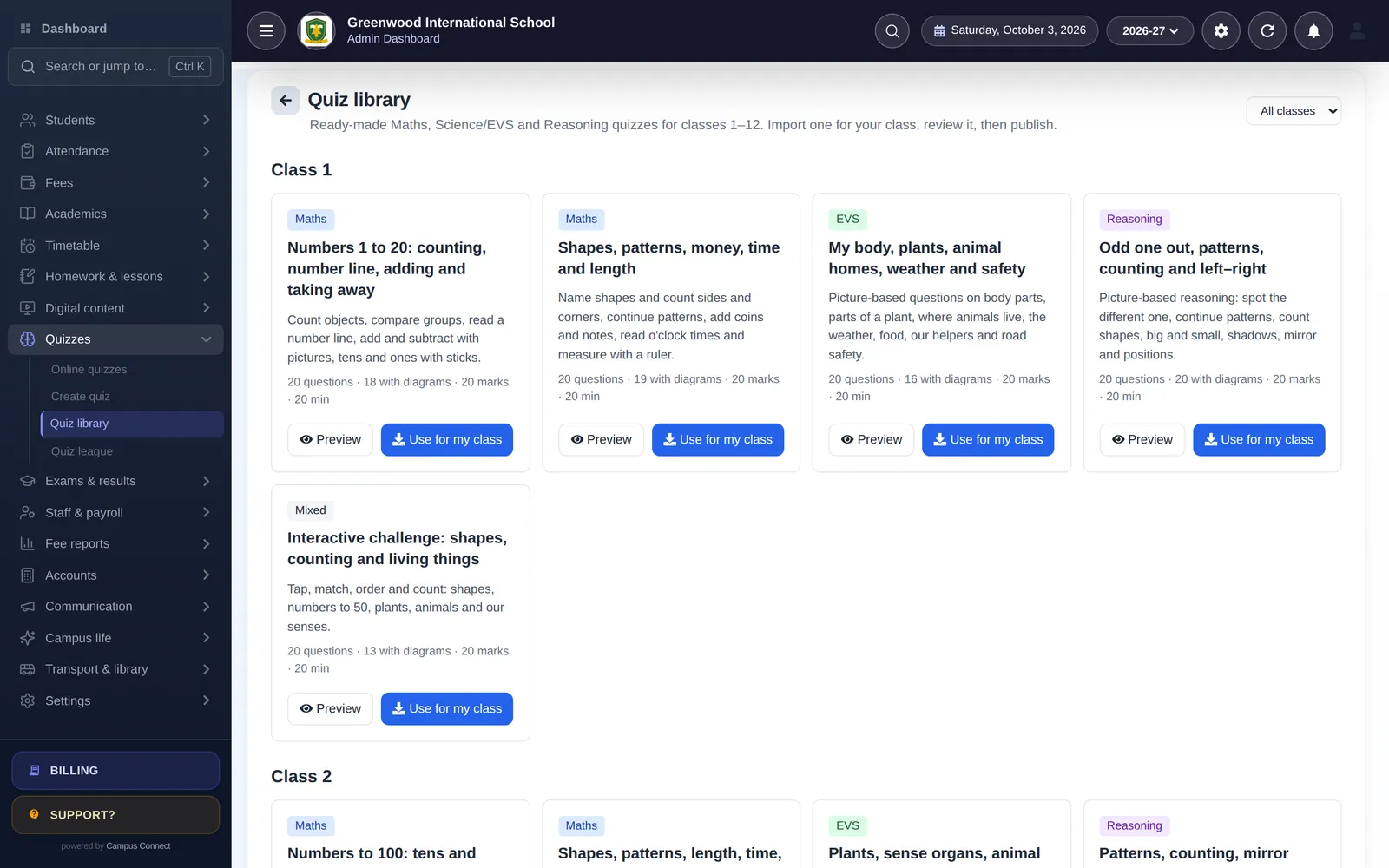
CampusConnect includes a library of 60 ready-made, diagram-based quiz sets for classes 1–12 in Maths, Science/EVS, Reasoning and interactive challenges — 20 questions each. Teachers preview a set, import it as a draft for their class, edit it and schedule it. Question types include multiple choice, tap on the diagram, match the pairs, put in order and number answers, with instant feedback and explanations. Results are available per quiz, and optional XP, badges, a class league and a section-wise House Cup keep students practising.
See the quiz library guide, or book a free demo to try it with your classes.